

OpenClaw vs. Notis.ai: Self-Hosted Power or Zero-Setup Delegation?
A fair founder-to-founder comparison of OpenClaw and Notis.ai: self-hosted control, setup burden, security ownership, pricing reality, and when each assist
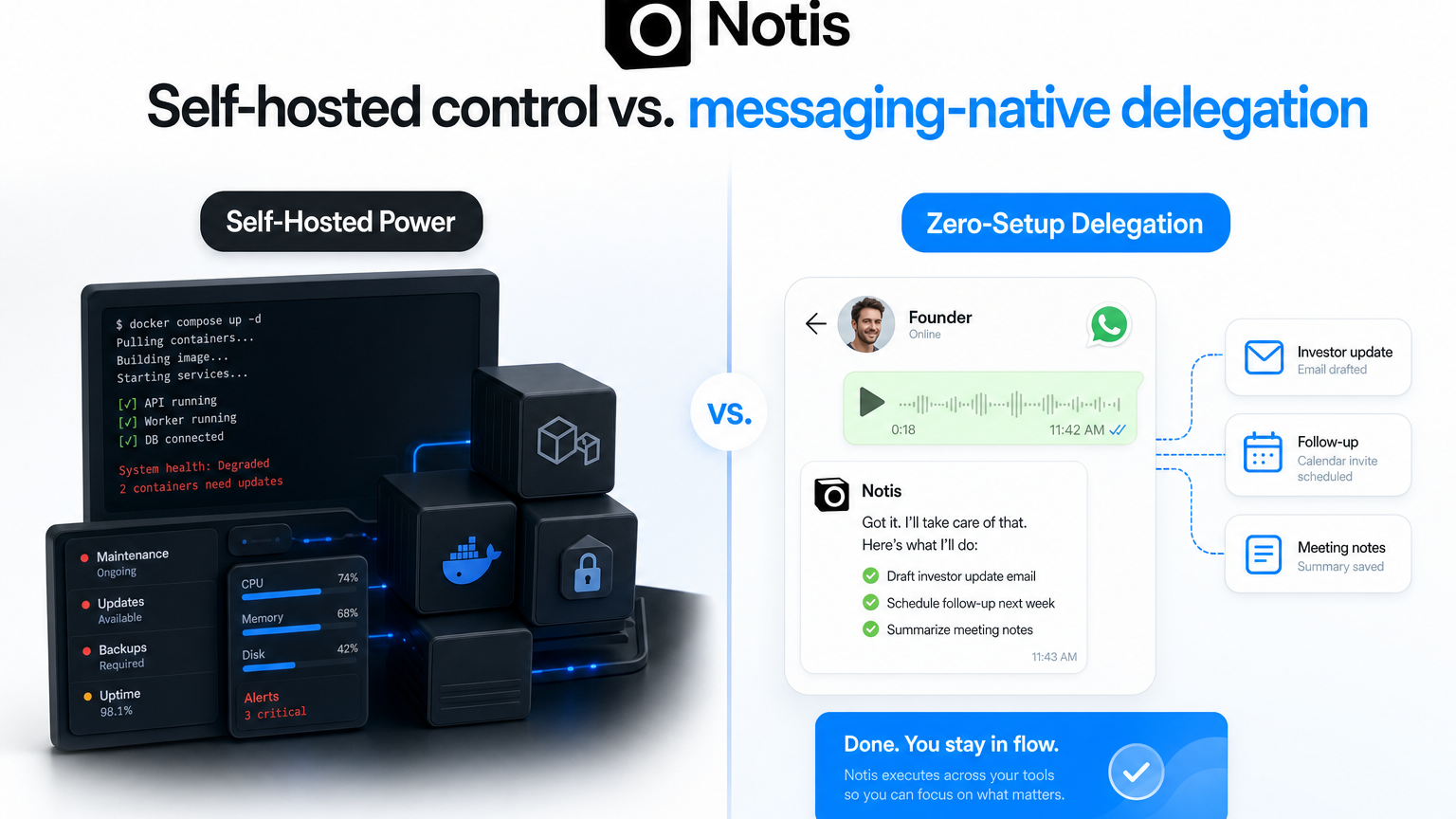
OpenClaw and Notis.ai sound weirdly similar on the surface. Both promise an AI agent you can talk to from the places you already live. Both care about workflows, not just chat. Both are trying to move AI from “nice answer, thanks” into “please actually do the thing.” But under the hood, they are built for very different people. OpenClaw is for the founder or operator who wants ownership, hackability, local control, and is willing to become a part-time AI sysadmin. Notis is for the founder who wants to send one message from WhatsApp, Telegram, iMessage, Slack, or email and get the work delegated without maintaining another machine, gateway, plugin stack, or Docker setup. That is the real comparison. Not “which AI agent is smarter?” The better question is: do you want self-hosted power, or do you want zero-setup delegation?
The short version
Choose OpenClaw if you want an open-source, self-hosted AI agent platform and you are comfortable owning the infrastructure. The official OpenClaw docs describe it as “fully open-source and self-hosted,” with 50+ channel integrations, 5700+ skills, model-agnostic LLM support, and a privacy-first approach where conversations stay on your infrastructure unless you configure external services. Choose Notis if you want an AI intern that is already hosted, already connected to the messaging surfaces where you work, and designed around delegation from a normal founder day. The public Notis homepage positions it as “Your AI Intern. One Message Away,” built to dump busy work and work like a team of ten. The billing docs frame Pro as a personal PA in WhatsApp, iMessage, Telegram, and email, Pro+ as recurring automation across tools, and Ultra as human-led agentic teams. I’m biased, obviously. I’m building Notis. But I’m also a founder, which means I have a deeply practical tolerance for tools: if the thing saves me time, great. If the thing creates another dashboard I need to babysit, straight to productivity jail.
Head-to-head: OpenClaw vs. Notis.ai
| Category | OpenClaw | Notis.ai |
|---|---|---|
| Best for | Technical users who want self-hosting, full control, and hackability | Founders and operators who want delegation from messaging apps without setup |
| Interface | Chat apps plus a self-hosted gateway/control layer | WhatsApp, Telegram, iMessage, Slack, email, and the Notis portal |
| Setup | Install runtime, configure gateway, choose model, connect channels, manage host | Subscribe, connect channels/integrations, delegate by message |
| Control | Very high: open source, local/custom infrastructure, model agnostic | Lower infrastructure control, higher operational convenience |
| Maintenance | You own updates, hosting, security posture, plugins, and network exposure | Notis owns the platform; you manage workflows, skills, automations, and approvals |
| Pricing reality | Software can be free/open-source, but you pay hosting, model usage, and maintenance time | Hosted subscription tiers: Pro, Pro+, Ultra, with usage budgets tied to plan |
| Security posture | Can be private and powerful, but risk depends heavily on deployment discipline | Hosted product model; less infra ownership for the user, less host-level blast radius to manage |
| Founder fit | Great if tinkering is the point or infra control is non-negotiable | Great if the point is getting the busy work out of your head today |
OpenClaw’s strength is also its tax
OpenClaw’s positioning is compelling. Its docs say it is open-source, self-hosted, model agnostic, and built for channels like WhatsApp, Discord, Telegram, Slack, Feishu, WeChat, Microsoft Teams, and more. The project site pitches “the AI that actually does things,” running on your machine, clearing inboxes, managing calendars, writing code, browsing the web, and working from chat apps. That is a real product direction, and I like the ambition. If you’re a technical founder, this is catnip. You get to inspect things. You can pick models. You can run local. You can build skills. You can tune the machine until it becomes your weird personal lobster-shaped command center. But there is a tax. Self-hosted software is never just “free.” It is free like a puppy is free. You still need to feed it, update it, secure it, and clean up when it breaks at 11:47 p.m. before a board update. OpenClaw’s own Docker documentation says Docker is optional and describes containerized gateway setup, image choices, onboarding, API keys, tokens, Compose startup, and security hardening for network exposure. Its security docs also define a personal-assistant security model, recommend audits before exposing network surfaces, and list checks around inbound access, tool blast radius, exec approval drift, browser control exposure, local disk hygiene, plugins, and sandbox policy drift. That is responsible documentation. It is also the point. If those words make you feel powerful, OpenClaw may be your thing. If those words make you quietly close the tab and go back to your inbox, Notis is probably closer to what you wanted in the first place.
The security question is not “open source bad”
I don’t want to do cheap FUD. Open source is not automatically less secure than hosted software. In many cases, the opposite is true. You can inspect it. You can patch it. You can isolate it. You can run it on hardware you control. The real issue is security ownership. When an agent can read files, run shell commands, browse authenticated sessions, connect to messaging apps, and execute skills, the blast radius is not theoretical. A Techzine report summarizing SecurityScorecard research described tens of thousands of exposed OpenClaw instances and highlighted risks around vulnerable versions, exposed control panels, credentials, browser sessions, and messaging accounts. OpenClaw’s own security guidance tells users to audit gateway exposure and think carefully about trusted boundaries. So the honest comparison is simple. OpenClaw gives you more control, which means you also inherit more responsibility. Notis gives you less infrastructure control, which is precisely the point for many founders. I don’t want my AI intern to become another production service I operate. I want to send the voice note and go make coffee.
Pricing: free software is not the same as free delegation
OpenClaw’s docs present it as open-source and self-hosted. That can make the software cost look like zero. But the practical cost is hosting, model API usage or local model hardware, your time, and whatever maintenance you put into channels, skills, permissions, monitoring, and backups. Notis is simpler to reason about because it is a hosted subscription. The Notis billing guide lists Pro at $20 per month or $13 per month annually, Pro+ at $59 per month or $39 annually, and Ultra at $149 per month or $99 annually. Each plan includes an agent usage budget based on OpenAI API prices equal to the monthly subscription amount. Is that as hacker-romantic as self-hosting? No. Is it easier to budget as a founder who just wants work done? Yes.
Choose OpenClaw if...
Choose OpenClaw if you are technical, you enjoy owning your stack, and self-hosting is part of the value for you. It makes sense if you have strict infrastructure requirements, want to experiment with local models, want to build custom skills deeply, or simply like the feeling of having the keys to the machine room.
Choose Notis if...
Choose Notis if your real problem is not “I need more infrastructure.” Your problem is that your life is scattered across messages, emails, meetings, ideas, reminders, and tiny obligations that never quite become finished work. Notis is designed for that founder reality: send a message, forward an email, dictate a thought, trigger an automation, and let the AI intern turn it into a next step. This is especially important for ADHD and neurodivergent founders. Another app to open is friction. Another dashboard is guilt with a sidebar. Messaging-native matters because the best capture system is the one you actually use when your brain is already moving too fast.
Choose neither yet if...
Choose neither yet if you do not know what work you want delegated. AI agents are not magic productivity incense. If your workflows are chaos, an agent can help, but you still need a few concrete jobs: summarize meetings, triage email, prepare briefs, save notes, schedule follow-ups, draft updates, research leads, or remind you before your brain deletes reality. Start with one recurring annoyance. If your annoyance is “I want total control over an agent running on my machine,” try OpenClaw. If your annoyance is “I keep forgetting to turn messages into finished work,” try Notis.
My take
OpenClaw is exciting because it pushes the AI assistant category toward real execution. I respect that. But for most founders, the bottleneck is not access to another powerful system. The bottleneck is follow-through in the middle of a messy day. That is why I think the future of personal AI is not just agents. It is agents inside the communication layer where life already happens. The best AI intern is not the one with the most impressive setup guide. It is the one you can message before you forget what you needed in the first place. Sources: OpenClaw docs, OpenClaw Docker install docs, OpenClaw security guidance, Techzine report on exposed OpenClaw instances, Notis homepage, and Notis billing guide.

Flo is the founder of Mind the Flo, an Agentic Studio specialized into messaging and voice agents.
Related posts
6 Base44 Alternatives Worth Switching To in 2026 (Priced Honestly)
Base44 quotes its $16-$160 tiers at the annual rate and runs two separate credit meters. Here are five app builders and one assistant that charge differently, every price read from the vendor's own site, with an honest catch for each.
7 Otter.ai Alternatives That Do Not Ration Your Meeting Minutes (2026)
Otter bills per seat but rations transcription minutes and caps meeting length, and trains its own models on de-identified user data. Seven alternatives compared on the unit each one actually meters, with every price taken from the vendor's own page.
6 n8n Alternatives That Fix the Licence or the Bill (2026)
Six real n8n alternatives, ranked on the two things that actually make people leave: the Sustainable Use Licence and per-execution billing. Prices quoted from vendor pages, licences read from the repos.