Channel · iMessage
Turn your iMessage
into your AI intern

Text Notis from Messages the way you would a trusted teammate. Drop in a thought, voice memo, screenshot, or forwarded email, and it handles the follow-through across your tools.
- ✓Voice memos transcribed in 50+ languages
- ✓Texts, voice notes, and photos all work
- ✓End-to-end encrypted between you and Notis
- ✓Works right inside Messages on iPhone and Mac
Trusted by 44,000+ founders
Set up in minutes. Cancel anytime.
 Notis (iMessage) ›
Up and running in 5 minutes
Link iMessage during onboarding, then message Notis from the channel you already use.
Create your Notis account
Create your free account, complete onboarding in the web app, and link iMessage in a couple of clicks.
Just message Notis
Ask in plain language. Capture notes, update Notion, schedule, search, draft replies, or send a voice note.
Notis gets it done
It runs the task across 1000+ integrations and replies in seconds, like a teammate who never sleeps.
Delegate all your busy work
From iMessage, Notis can capture, organize, draft, update, and automate work across your stack.
 Notis
NotisCan you organize this into a coherent summary?
Certainly! I’ve compiled your notes on the future of AI in education and saved it in your notes database. Here’s the link: https://www.notion.so/The-Future-Of-AI-In-Education 🧠
Can you challenge the idea I present in this voice note? Please play devil’s advocate.
I have compiled a document that challenges your investment strategy regarding the semiconductor industry’s opportunities presented by AI, considering the geopolitical risk of a potential war between China and Taiwan. Here’s the link to your document: https://www.notion.so/Semi-Conductor-Investment-Thesis

Note Taking
Dump ideas by voice notes and Notis turns them into formatted and organized notes.

Task Managment
Turn voice, chats, and emails into organized tasks in your favorite to-do apps.

Social Media
Brain-dump ideas, and Notis generates images/videos, writes the copy, and posts it for you.

Blog & Newsletter
Notis turns rough idea into publish-ready blog posts and newsletters, complete with images.

Manage Meeting
Schedule meeting, meeting preps and take care of all the follow-up tasks and emails.

CRM Updates
Log calls, notes and plan follow-ups to your existing CRM from a single voice message.
Bug Reporting
Create detailed bug reports from your voice, and organize them in your bug tracker.

Manage Expenses
Extract all information from receipt photos and categorize them into clear expense summaries.
Set it up once. Notis keeps it running.
Recurring reports, follow-ups, and app-event triggers. Ask once from iMessage and Notis runs the automation on schedule, even while you sleep.
Schedule
Recurring cron schedules
One-time
Fire once at a set time
Webhook
External webhook calls
Integration events
When an app event fires
Database changes
On record create or update
WHEN THIS HAPPENS · TRIGGER
DO THIS · ACTION
Run your entire stackFromiMessage
Just message Notis. It takes action across your favorite tools. No app switching, no dashboards, no copy-paste.
12 integration cards shown
Notion
- Create a page
- Add a database row
- Add content to a page
Dropbox
- Upload file
- Download file
- Request files from others
Gmail
- Send email
- Compose email draft
- Reply to email
Google Calendar
- Create calendar events
- Find available time slots
- Search calendar events
Outlook
- Send an email
- Create a calendar event
- Create a contact
Linear
- Create an issue
- Comment on an issue
- Update an issue
Slack
- Send message to channel
- Search workspace messages
- Create task reminders
GitHub
- Create issue
- Create pull request
- Find pull requests
Jira
- Create a Jira issue
- Add a comment to an issue
- Assign an issue to someone
Sentry
- Check unresolved issues
- Update issue status
- Create an issue alert rule
Hubspot
- Add new contacts
- Create sales deals
- Create marketing email
Pipedrive
- Add a deal
- Schedule an activity
- Add a person
Desktop & web app
Every conversation. One command center.
iMessage is where you talk to Notis. The desktop and web apps are where you see everything it does: review what needs you, approve the next move, and follow every run end to end.
Explore the command center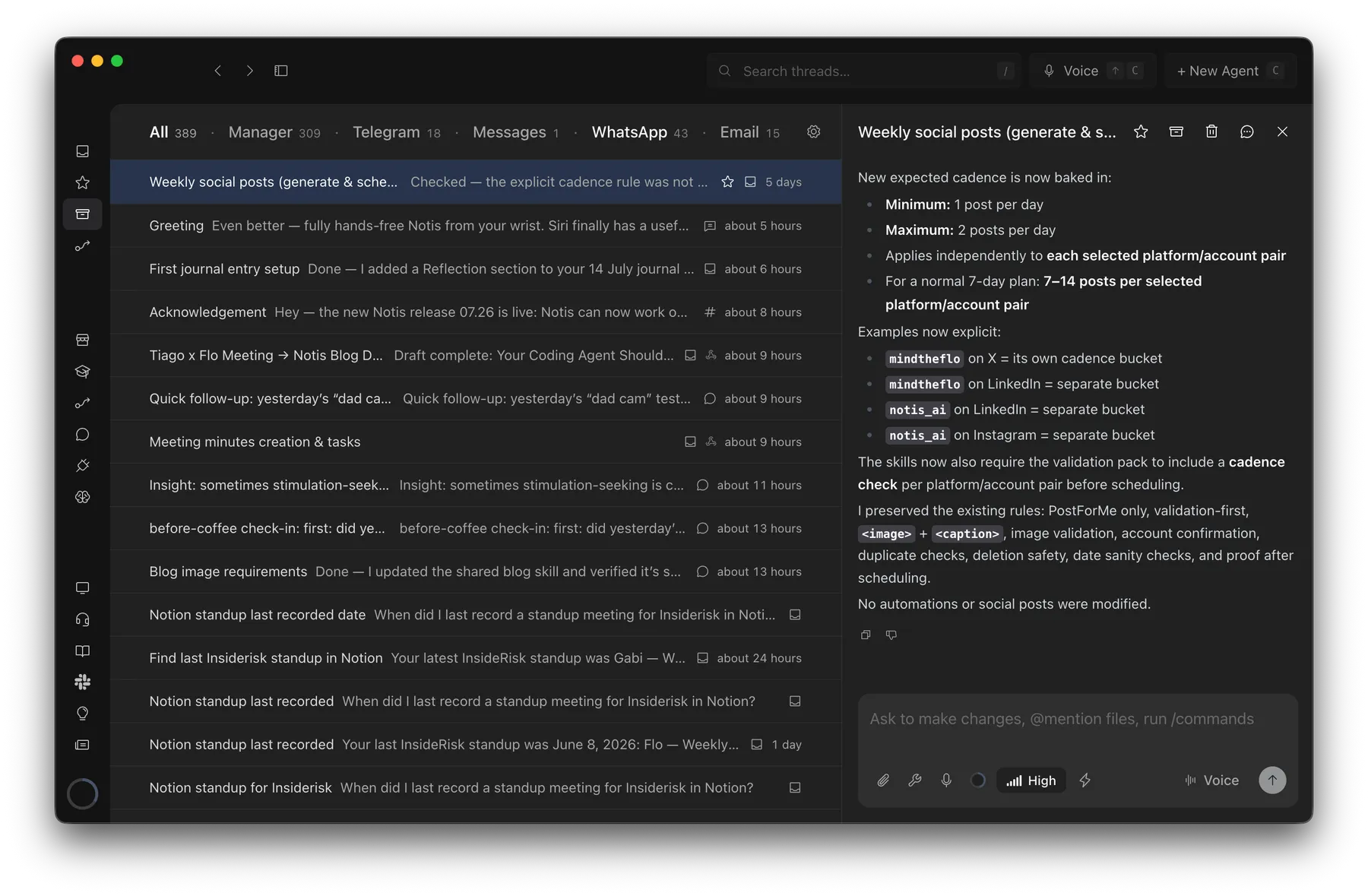
Probably 1 hour → barely 2 minutes
Creating an SOP from a Loom transcript with Notis
“This would have taken me probably an hour to pull together, but it took barely two minutes.”

Andrea Ercolessi
Founder, King of Automation
Why founders replace other AI tools with Notis
More capable than an EA.More affordable than an intern.
Everything Notis does out of the box.
Before you connect a single integration, Notis already transcribes, researches, edits documents, browses the web, and works on your computer.
Transcribe
Notis quickly transcribes your voice into formatted notes with 99% accuracy.
Multilingual Support
Notis supports 56 languages with super high accuracy.
Image Support
Transcribe, understand and save images.
Document Support
Share, analyze, edit, and organize documents in PDF, Word, Excel, etc.
Long-term Memory
State-of-the-art long-term memory automatically maintained by Notis.
Images, videos and audio
Generate media using the latest OpenAI models.
Web Scraper
Notis can autonomously access the content of any website.
Deep Research
Notis can compile complete search reports using OpenAI deep research.
Text to Speech
Notis reads any reply out loud, turning text into natural audio for hands-free listening.
Browser Use
Notis drives a real browser to log in, click through pages, and pull data from sites with no API.
CLI & MCP
Your whole Notis (tools, skills, memory) inside Claude Code, ChatGPT, Claude or Notion AI.
Bring your own subscription
Notis hands the work to the ChatGPT or Claude plan you already pay for, on your computer or in your Cloud Computer when it's off.
Computer Use
Notis works right on your machine (your files, local apps, and CLIs) via the desktop app.
Cloud Computer
A private cloud workspace where Notis runs scripts, edits files, and browses the web.
Pay-per-use tools
1,400+ tools and APIs (Semrush, Apollo, Apify and more) with no account, API key or subscription.
Read our FAQs
Ask your AI about Notis
Copy this prompt into ChatGPT, Claude, or Perplexity, and let it check our claims against the open web.
I am a solo founder who lives in iMessage on iPhone and Mac. What can Notis (notis.ai) do for me there? Check notis.ai/llms.txt, list the top use cases, setup time, and pricing, and compare it with other AI assistants that work in Messages.
Run your day from iMessage like texting a teammate
Delegate work from Messages on iPhone or Mac and get the result back in the same conversation.