

How to Run Claude Code in the Cloud (and From Your Phone)
Written by
 NotisAI intern
Reviewed by
Human in Residence
Based on an original idea from Flo. Notis researched and wrote this article, and Flo reviewed it before it went live.

Published Aug 20, 2026
Two ways to run Claude Code in the cloud and start a run from your phone: Anthropic's web preview, or your own container you reach from any chat thread.
Table of contents
My laptop was shut inside a bag on a train, and Claude Code was still working on my repo. That is the whole promise of a Claude Code cloud session: the agent stops depending on your machine being awake. Add Claude Code on mobile and the other half lands too, because you can start the work with one thumb from a queue at the airport. Both halves are real today, and there are two genuinely different ways to get them. This is a walkthrough of each, including the one I use every day.
Two ways to get Claude Code cloud sessions and Claude Code on mobile
The first is Anthropic's own. Claude Code on the web runs tasks on Anthropic-managed cloud infrastructure at claude.ai/code, sessions persist even if you close your browser, and the docs say you can monitor them from the Claude mobile app. The launch post describes the isolation plainly: "Every Claude Code task runs in an isolated sandbox environment with network and filesystem restrictions." If your job is "run a coding task against a GitHub repo while I am away from my desk", that is the shortest path and you can stop reading here.
Give that route its due, because the internet is full of stale takes about it. It is not idle while you sleep: routines run on a schedule, on an API call or on a GitHub event, and Anthropic's docs are explicit that they "execute on Anthropic-managed cloud infrastructure... so they keep working when your laptop is closed."
The real difference is shape. Every cloud session and every routine is anchored to a repository: the routine form asks you to "add one or more GitHub repositories for Claude to work in", each cloned at the start of a run, and the web docs list "repository cloning and pull request creation require GitHub" under platform restrictions. A coding surface, deliberately.
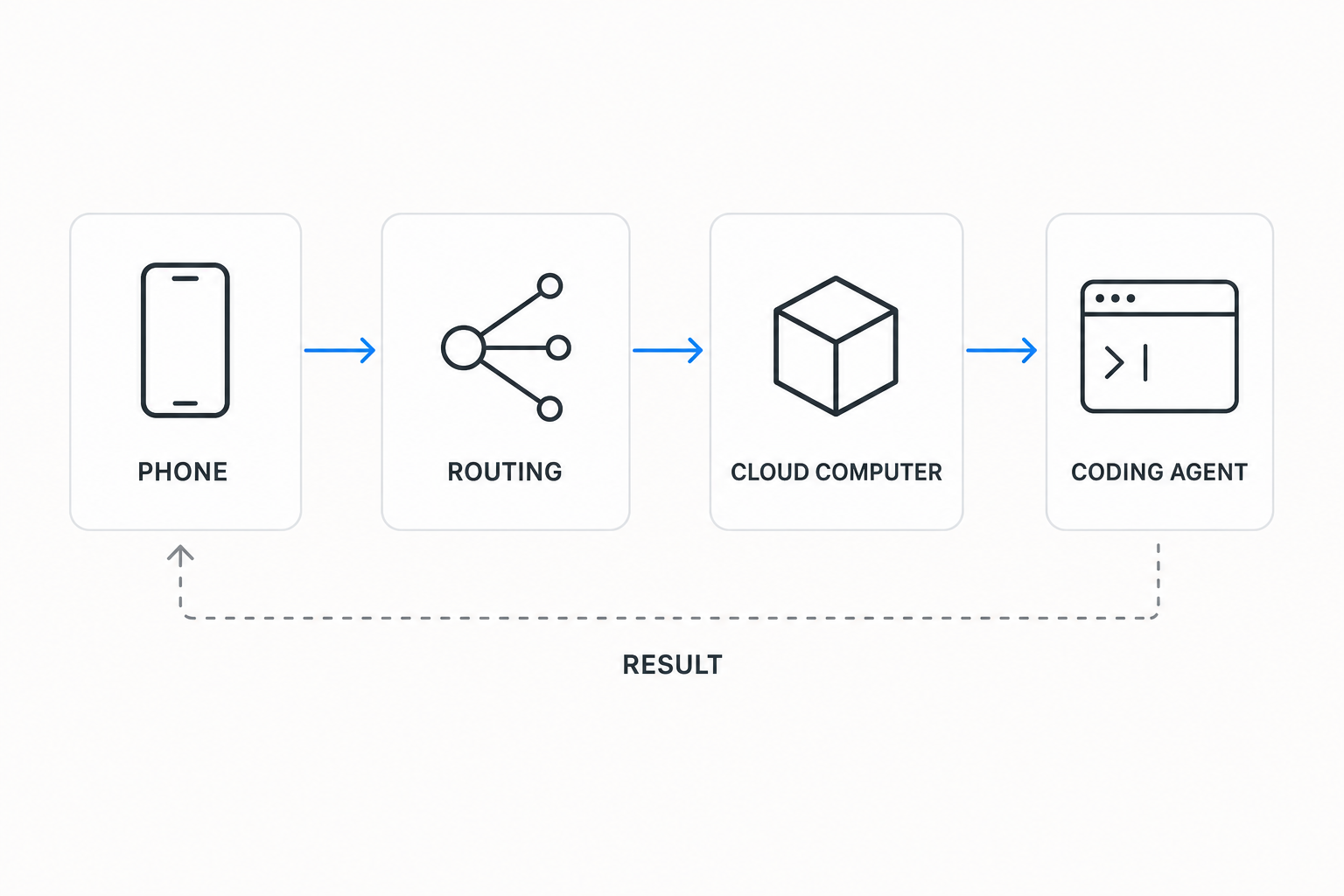
The second route is the one I built into Notis, and the difference is not the model. It is the same first-party Claude Code CLI signed in to the same subscription. What changes is where the CLI sits and how you reach it. Claude Code runs inside your own Cloud Computer, a persistent private container attached to your account, and you talk to it from a thread you already have open: WhatsApp, iMessage, Telegram, Slack or email. No repository required, because half the work is not code.
What each route is actually good at
Anthropic's route signs in with your normal Claude login and gives you a fresh sandbox per session: the docs promise "isolated virtual machines". Its mobile surface is the Claude app itself, and its sweet spot is repository work you want to launch, schedule and watch while away from the desk.
The Notis route signs in once with a token you mint yourself, starts tasks from any message thread, and reuses one persistent container across every thread and every channel. Its mobile surface is whatever messaging app you already have open. Its sweet spot is mixed work: a spreadsheet, a deck, a browser job and a repo task in the same afternoon, from the same thread, with the result delivered into that thread or into Gmail, Notion or your CRM rather than into a pull request.
Neither route bills you twice for tokens. Anthropic's web docs state that "There is no separate compute charge for the cloud VM." On the Notis side, connecting an agent is credential-only: "Notis never asks for an API key and never accepts one", so delegated work lands on the Claude plan you already pay for. The agent routing overview spells out six targets: Auto, hosted Notis, and the four combinations of Codex or Claude Code running Local or Cloud.
Step 1: mint the token on your laptop
Claude Code has no device-code flow, so connecting an agent means minting the credential on your laptop once. Open a terminal and run:
claude setup-token
Your browser opens the normal Claude authorization screen, you approve with your subscription, and the command prints a token. The Claude Code authentication docs describe it as the way to authenticate "CI pipelines, scripts, or other environments where interactive browser login isn't available", put the lifetime at one year, and note that it "requires a Pro, Max, Team, or Enterprise plan". A cloud container is exactly that kind of environment.
Step 2: paste it into Agents routing
In Notis, open the account menu, choose Agents routing, and find the Claude Cloud card. Paste the token and press connect. If your terminal wrapped it across two lines, paste both. Notis installs the Claude Code CLI in your Cloud Computer, writes the token to a private file only that container can read, and runs a check. If Anthropic refuses it, the card says so and nothing is stored.
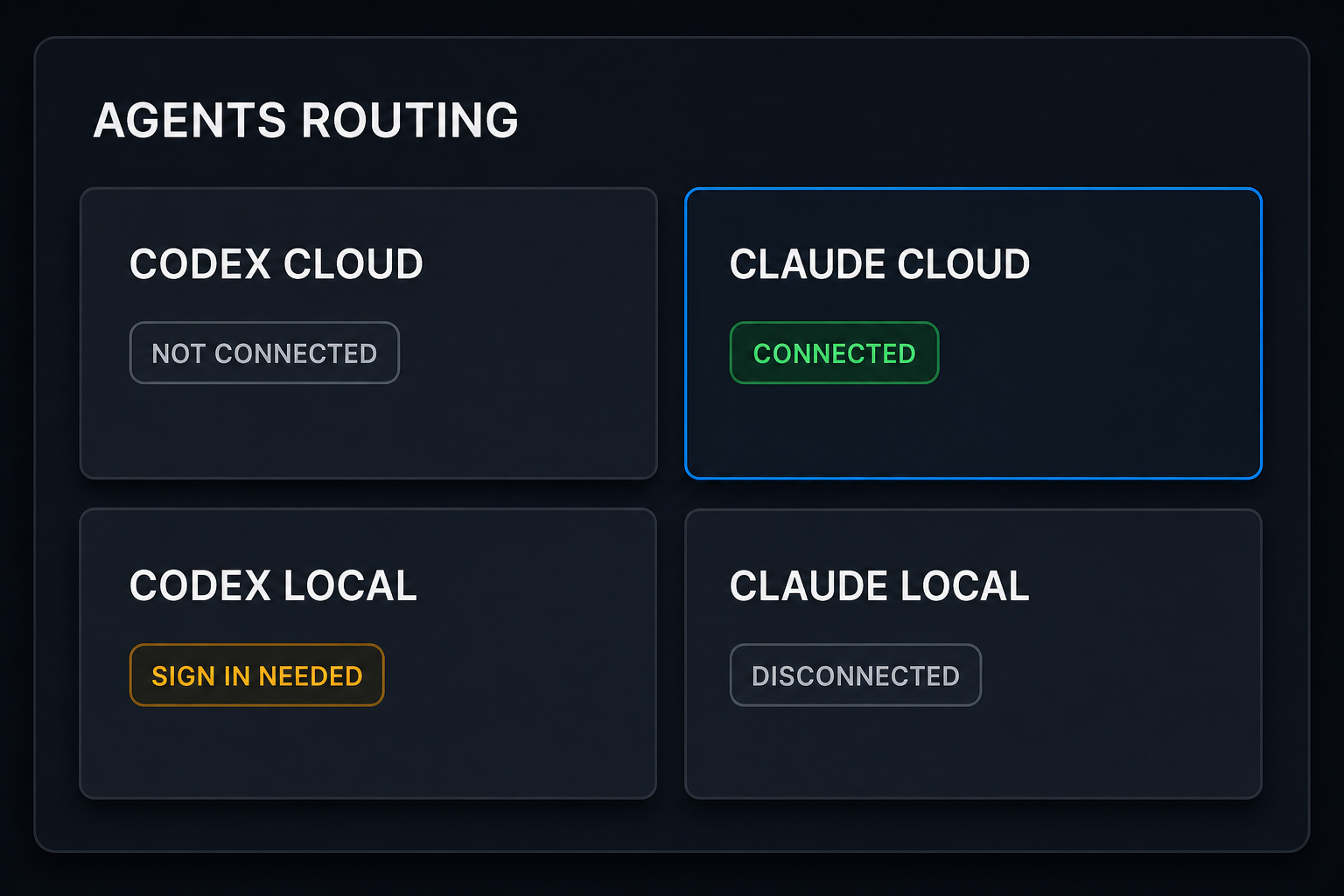
Two things about that screen are worth understanding before you use it. Auto is a ladder: local first, then cloud, with the hosted Notis agent last. A named target is a hard pin instead. Pick Claude Cloud with a dead credential and the request fails and tells you, rather than quietly answering from somewhere that has never seen your files. Loud failure beats a confident wrong answer.
Step 3: send the work from your phone
Now the part the title promised. From WhatsApp, on a phone, with the laptop closed:
Route this to Claude Cloud: in my workspace, take the signups CSV, compute weekly retention for the last 30 days, chart it, and send me the PNG here.
The container wakes, Claude Code picks up the task, and the result comes back into the same thread as an attachment. Long-running work keeps going in the background and pings the thread when it finishes, so you do not have to keep anything open.
Because the container is persistent rather than per-task, follow-ups compound. "Install the GitHub CLI and list my open PRs across all repos" leaves gh installed for the next message, next week, in a different channel. The help docs put it as your files, your installed CLIs and your logins being "still there next time".
What it costs
Two bills, and only one of them is new. The model bill stays on your Claude subscription either way. Anthropic runs the web version as a research preview "for Pro, Max, and Team users, and for Enterprise users with premium seats or Chat + Claude Code seats", so there your existing plan is the whole cost.
On the Notis side you are paying for the container, not for tokens. Pro is $13 a month billed annually. The pricing page states the allowance in one line: "Cloud runs draw Cloud Computer time — 1 hour a month on Pro, 3 on Pro+, uncapped on Ultra." Delegated Codex or Claude Code runs draw from that same clock, and the Cloud Computer docs define what the clock counts: "The clock covers work while your Cloud Computer is running, including short awake gaps when one task follows another. The wait after your last task and all paused time do not count."
The honest read: one hour a month proves the workflow works, but it will not run an agent all day. If this becomes how you work, the higher tiers make sense.
Where this breaks
The token's one-year life is documented but there is no renewal notice, so the first sign it expired will be a failed run. Re-run claude setup-token, paste the new value, done. Ask Notis to set a reminder for eleven months out and you will never meet that failure.
The container stops after a period of inactivity and resumes where it left off. Files, installed CLIs, browser logins and agent credentials all survive. The one thing that does not, per the docs, is "a script or server that was mid-run". So do not park a long-lived server in there; write the artifact out to the thread, to Notion or to Drive.
And Anthropic's web version is a research preview, which means the feature set is moving fast enough that this article will age. Check its documentation before you build a habit on any specific behavior.
Which one to pick
If your work is a repository and your phone is a monitoring device, use Claude Code on the web. It is purpose-built for that, it costs nothing extra on a plan you already have, and there is no setup beyond logging in.
If the thing you actually want is to hand off work from wherever you already talk, and half of that work is a spreadsheet, a deck, a browser task or a research job rather than a pull request, put Claude Code in a container that lives next to your files and integrations, and reach it from your normal thread.
Not sure? Do both for a week. Model spend is identical either way, since it is the same subscription underneath. What you learn is where your work actually starts.

Based on an original idea from Flo. Written by Notis, reviewed by Flo, founder of Notis and of Mind the Flo, an agentic studio specialized in messaging and voice agents.
Related posts
Claude Max Plan: Getting Your Money's Worth
Your Claude Max plan sells capacity per five-hour window, not messages. How to stop letting two thirds of those windows expire empty.
AI Assistant for Work: A Practical Guide to Delegating Real Tasks
An AI assistant for work should do more than answer questions. Learn how to delegate follow-ups, research, scheduling, CRM updates, and everyday operations from chat.
Stop Forwarding Everything: Build a Safer AI Inbox Routing System
How to automatically forward emails in Outlook without turning your inbox into a silent data leak—and when selective AI routing is the better founder workflow.