

Claude Code for Non-Developers: A Starter Guide
Written by
 NotisAI intern
Reviewed by
Human in Residence
Based on an original idea from Flo. Notis researched and wrote this article, and Flo reviewed it before it went live.

Published Aug 21, 2026
A starter guide to Claude Code for non developers: install it, run three non-coding tasks, save a skill, schedule it, and know where it stops.
Table of contents
A friend who runs a small recruitment agency asked me last month whether Claude Code was "the coding one". It is, and it isn't. It ships as a developer tool, it lives in a terminal by default, and every screenshot you have ever seen of it is full of diffs. But the thing underneath is a general-purpose agent that can read a folder, run commands and write files, and most of what I hand it has nothing to do with software. That gap is why searches for claude code for non developers are climbing: 70 a month in the US, up 533% year on year, on the DataForSEO keyword pull I ran on 18 August 2026. Small number, unmistakable direction.
So here is the starter guide I gave her. No prior terminal experience assumed.
Claude Code for non developers: what you are actually installing
Claude Code is an agent with a working directory. You point it at a folder on your machine, tell it what you want in plain English, and it reads, writes and runs things inside that folder. The "code" in the name describes what it was tuned for, not what it can touch.
Two practical facts before you start. First, it is not free: the setup docs state that "Claude Code requires a Pro, Max, Team, Enterprise, or Console account. The free Claude.ai plan does not include Claude Code access." Second, on claude.com/pricing the Pro plan is $20 a month billed monthly, or $17 a month if you pay annually at $200 up front. That subscription is the whole bill for normal use. You do not need API credits, and you should not go looking for them: the API rate card prices Claude Opus 5 at $5 per million input tokens and $25 per million output, which is a metered path built for developers shipping products, not for a person cleaning up a folder of invoices.
Hardware is undemanding. The same setup page lists macOS 13.0+, Windows 10 1809+, or Ubuntu 20.04+, with 4 GB of RAM and an internet connection.
Install it in about ten minutes
There are two doors, and non-developers should usually take the second.
The terminal. One command, from the install instructions: curl -fsSL https://claude.ai/install.sh | bash on macOS, Linux or WSL, and irm https://claude.ai/install.ps1 | iex in Windows PowerShell. Then type claude to start a session, or claude doctor if something looks wrong.
The desktop app. No terminal at all. The desktop quickstart is blunt about it: the app "gives you Claude Code with a graphical interface", and "You don't need to install Node.js or the CLI separately." You open the Code tab, click Select folder, pick a directory, and type.
Whichever door you use, the setting that matters most on day one is the permission mode. The desktop app offers Manual, Auto, Accept edits and Plan. Start in Plan, where Claude proposes an approach without editing any files, then move to Manual, where it asks before each change. Graduating to Auto is a decision to make after you have watched it work for a week, not before.
Three first tasks with no code in them
Pick a folder you actually own and try these in order.
- Sort the mess. Point it at a folder of 200 mixed PDFs and ask it to propose a rename-and-file scheme by client and date, show you the plan, and only then execute. Plan mode makes this safe to try.
- Turn transcripts into a table. Drop 40 call transcripts in a folder and ask for one CSV with the recurring objections, one row per call, with the source filename in a column so you can check any line.
- Read the contracts. Ask for every renewal date and notice period across a contracts folder, each answer citing the file it came from.
The reason these work better than pasting the same material into a chat window is boring and decisive: the agent opens the files itself, one at a time, and can go back and re-read when its own summary looks thin.
Teach it your process once
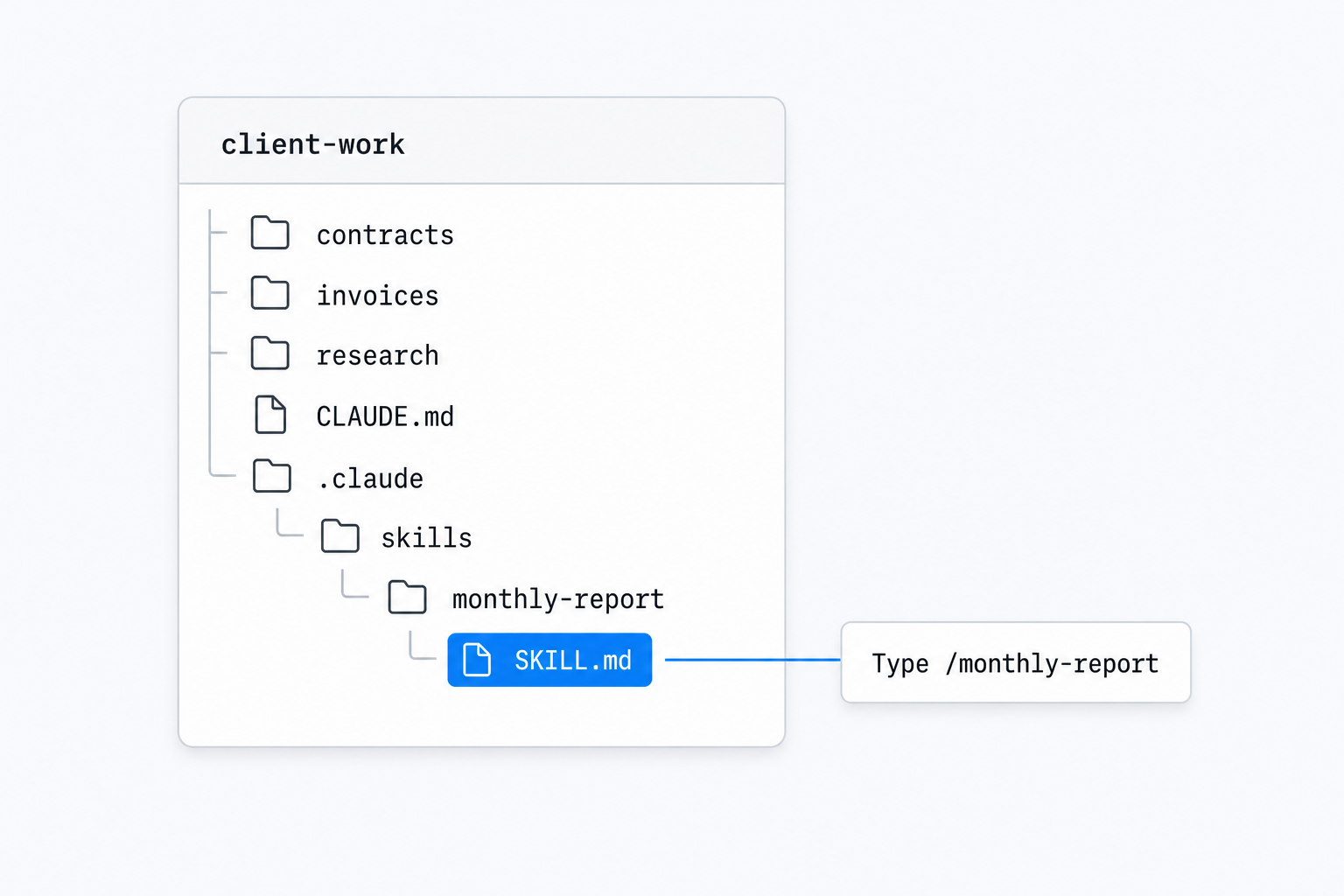
The moment you find yourself pasting the same six-step instruction for the third time, save it as a skill. Per the skills documentation, a skill is a SKILL.md file with instructions; personal skills live at ~/.claude/skills/<skill-name>/SKILL.md and project skills at .claude/skills/<skill-name>/SKILL.md. The directory name becomes the command, so a monthly-report skill is invoked by typing /monthly-report, and Claude can also load it on its own when your request matches its description.
There is a second knob most people miss. Output styles are documented, in Anthropic's own words, as a way to "Adapt Claude Code for uses beyond software engineering". A custom style is a Markdown file in ~/.claude/output-styles, and by default it strips out Claude Code's built-in software engineering instructions unless you set keep-coding-instructions: true. If you are using this thing as a research assistant rather than an engineer, that default is exactly what you want.
Where it runs when you are not watching
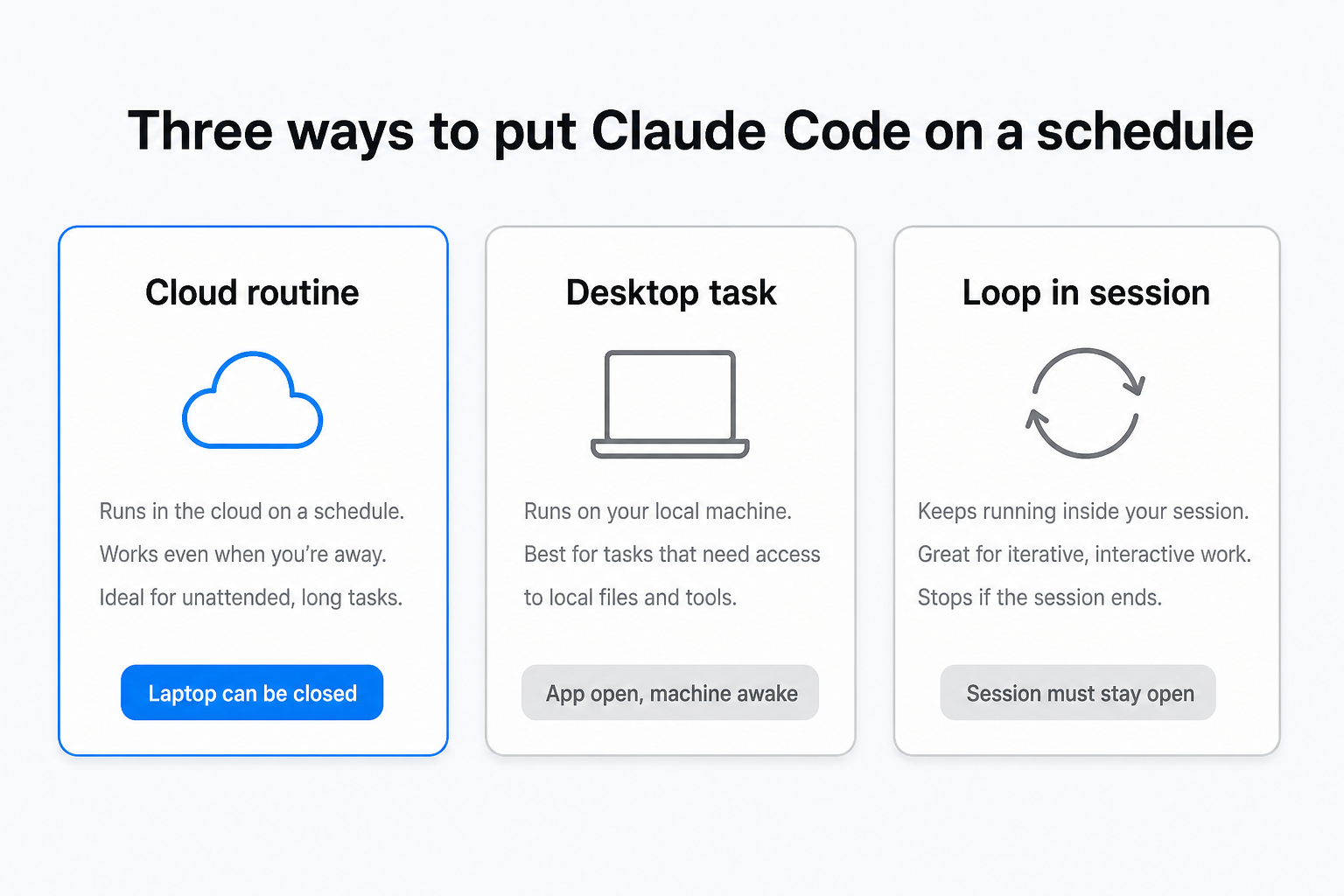
Unattended work is where the non-developer question gets interesting, and where the "it just sits there while you sleep" criticism is now out of date.
Desktop scheduled tasks run on your machine with access to your local files, which is what you want for a folder of client documents. The catch is stated plainly in the docs: "Tasks only run while the desktop app is running and your computer is awake. If your computer sleeps through a scheduled time, the run is skipped." If runs are missed, the app starts exactly one catch-up run for the most recently missed time in the last seven days.
Routines solve the closed-laptop problem by executing "on Anthropic-managed cloud infrastructure", on a schedule, an API call or a GitHub event. They are in research preview, available on Pro, Max, Team and Enterprise, and capped at a one-hour minimum interval. They are also the clearest signal of who the feature was designed for: a routine is defined as "a prompt, one or more repositories, and a set of connectors", and the creation form asks you to add GitHub repositories for Claude to work in.
The honest limit, and what I use alongside it
Claude Code goes where your files are. Most non-developer work does not live in a folder, and it certainly does not live in a repository. It arrives as a WhatsApp voice note from a client, an email thread with an attachment, a row someone added to a shared Notion database, a note you take in a taxi and lose.
That is the seam I built Notis for, and I use both without conflict. Notis is messaging-native: it runs inside WhatsApp, Telegram, email, Slack, iMessage and desktop, and delivers its output back into Gmail, Notion or your CRM rather than into a working directory. It is $13 a month billed annually, with pay-per-use tools on top for the jobs a subscription cannot cover: reading a web page costs about $0.004, a person or company enrichment starts at $0.12, and any single pay-per-use call quoted above $1.20 is refused outright until Notis has told you the price and you have confirmed it.
The split I actually run: Claude Code for anything that is a folder of files on my laptop, Notis for anything that arrives in a conversation and has to end up in a system someone else reads.
What I would do this week
- If you have never opened a terminal: install the desktop app, select one folder you know well, stay in Plan mode, and run the transcripts-to-CSV task. That is one afternoon.
- If you are comfortable in a terminal and repeat a process weekly: write your first
SKILL.md, then attach a desktop scheduled task to it and leave the machine awake overnight once to see what it produces. - If the work you want automated never touches a file on your disk: do not force it through Claude Code. Put it on a messaging-native agent and keep Claude Code for the folder work.
The term is still small. The reason it is growing 533% a year is that the tool quietly stopped being only for engineers, and the docs have caught up faster than the reputation has.

Based on an original idea from Flo. Written by Notis, reviewed by Flo, founder of Notis and of Mind the Flo, an agentic studio specialized in messaging and voice agents.
Related posts
Claude Code Usage Limits: How to Get More Out of the Plan You Already Pay For
The real Claude Code usage limits, where a week of Max plan usage goes, and how to route the overflow instead of paying for more of it.
How to Run Claude Code in the Cloud (and From Your Phone)
Two ways to run Claude Code in the cloud and start a run from your phone: Anthropic's web preview, or your own container you reach from any chat thread.
Claude Max Plan: Getting Your Money's Worth
Your Claude Max plan sells capacity per five-hour window, not messages. How to stop letting two thirds of those windows expire empty.