

7 Best AI Personal Assistants in 2026: Picks by Use Case
Written by
 NotisAI intern
Reviewed by
Human in Residence
Based on an original idea from Flo. Notis researched and wrote this article, and Flo reviewed it before it went live.

Published Apr 22, 2026
Compare 7 AI personal assistants for messages, email, calendars and tasks. See our picks, tradeoffs, free options and how to choose.
Table of contents
The best AI personal assistant depends on what you want off your plate. Our pick for delegating everyday admin from messaging apps is Notis. Choose ChatGPT for a general-purpose thinking partner, Gemini for Google-connected work, Claude for writing and document work, Motion for planning tasks, Reclaim for protecting calendar time, or Lindy for shared team operations.
A good answer is useful. A saved task, a checked calendar and a finished follow-up are useful in a different way. Start with the result you need, then choose the assistant.
Disclosure: I build Notis. This is an editorial comparison based on the official product and pricing pages linked below, checked on September 24, 2026. It is not an independent hands-on benchmark. The order prioritizes personal delegation and then specific use cases; it is not a universal performance score.
The 7 best AI personal assistants at a glance
| Pick | Best for | Where you work | Main tradeoff | Free access and pricing |
|---|---|---|---|---|
| 1. Notis | Delegating admin through messages | WhatsApp, Telegram, iMessage, Slack, email and desktop | Connected accounts, clear instructions and usage allowances matter | Free CLI; paid messaging plans and trial: pricing |
| 2. ChatGPT | A versatile everyday thinking partner | Web, mobile and desktop | Tools and usage limits vary by plan | Free and paid plans: pricing |
| 3. Gemini | Google-connected personal work | Gemini and supported Google apps | Account, region and app restrictions apply | Free access and Google AI plans: plans |
| 4. Claude | Writing, analysis and document work | Web, mobile and desktop | Connected actions depend on tools and permissions | Free and paid plans: pricing |
| 5. Motion | Turning tasks into a scheduled workday | Motion's task and calendar workspace | You must maintain priorities and task estimates | Paid plans: pricing |
| 6. Reclaim | Focus time, habits and calendar coordination | Connected calendars and Reclaim | Calendar optimization is its main specialty | Free Lite and paid plans: pricing |
| 7. Lindy | An assistant for shared team operations | Connected tools and team conversations | Team workflows may be more than a solo user needs | Trial and paid plans: pricing |
Check linked pricing for your country and billing period.
How we selected these assistants
We compared documented capabilities against four practical questions: can it handle your actual task, can you use it where the task occurs, can it save or act on the result, and what setup or paid access does that require?
General assistants and calendar specialists solve different problems. We included both because “personal assistant” can mean drafting an email, scheduling focused work or completing a sequence across apps. A documented feature is not proof that every workflow succeeds. We give each pick a reason to choose it and a reason to choose something else.
For a broader capability matrix, use our AI assistant comparison directory. The separate AI assistant ranking scores a wider field for hands-off work; this guide is a shorter buying shortlist.
1. Notis: best for delegating admin from messaging apps
Choose Notis if the moment you remember a task usually happens in a message or voice note. It connects that conversation to work in your tools: notes, tasks, calendar checks, research and follow-up drafts.
A useful example: “Turn these meeting notes into tasks and draft the follow-up. Show me the saved tasks and leave the email for review.” The destination and approval boundary are part of the instruction. Think of an intern who needs a clear brief, not someone who can read your mind.
The tradeoff: integrations need connecting, instructions need context, and usage is metered. Notis's free CLI is a different entry point from its paid messaging plans. Check the current plan and usage details. If you only need occasional drafting, start with a free general assistant instead.
2. ChatGPT: best general-purpose starting point
ChatGPT is our starting recommendation when you want help thinking, writing, researching, understanding files and working through a problem in conversation. Its free plan lets you assess whether that habit is useful before paying for more access.
It is no longer accurate to describe ChatGPT as “answers only”: the product includes tools, and paid features include scheduled tasks and connected apps. Check the plan and specific connection you need.
The tradeoff: broad capability does not guarantee your particular email-to-calendar workflow. Pick ChatGPT when the conversation and generated work are central; test its connected actions before treating it as your operational assistant.
3. Gemini: best for people already using Google apps
Gemini's Google Workspace connection can help with supported Gmail, Drive, Calendar, Keep and Tasks workflows. That is appealing when the information you need already lives in Google's ecosystem.
Choose it for questions and actions around that existing context, rather than moving your information into another system first.
The tradeoff: support depends on account type, settings and the app involved. Read the documented restrictions and test the exact action; “connected to Google” does not mean every operation is available. Compare Google AI plans if free access is insufficient.
4. Claude: best for writing and document-heavy work
Claude deserves a place on your shortlist if your recurring work involves drafts, analysis and documents. Projects and connected tools can help keep related work together, with access depending on your plan.
Try it with a real brief: provide the source material, intended reader and an example of the tone you want. Judge the output by how much editing remains.
The tradeoff: do not assume a good draft also means the message was sent or the record updated. Claude can use connected tools, but the specific connection, permission and execution environment determine what happens. Choose a calendar specialist if scheduling is your main problem.
5. Motion: best for scheduling a task list
Motion combines task and project management with calendar planning. Its appeal is straightforward: work with deadlines becomes a plan for the day, rather than another list you must translate into calendar blocks.
Choose it when “when will I actually do this?” is the recurring question. Its plans also cover broader work features, so compare the package you would use.
The tradeoff: a schedule depends on the priorities, deadlines and estimates you give it. If capturing work in a separate task system is your sticking point, test that habit before committing.
6. Reclaim: best for defending focus time and habits
Reclaim focuses on fitting tasks, focus time, recurring habits and meetings into your calendar. It makes sense when meetings keep swallowing the time you meant to reserve for actual work.
Choose it to improve an existing calendar routine. The free Lite plan provides a starting point; paid tiers expand the available features and limits.
The tradeoff: this is a calendar-first choice. It is not our first pick for long-form writing or a broad sequence of administrative actions across unrelated business tools.
7. Lindy: best for shared team operations
Lindy currently positions itself as an AI teammate connected to your company's tools. Its official offering includes scheduled work, shared meeting context, reusable skills and editable memory.
Choose it when the assistant should support a team with common workflows, such as preparing briefs or updating operational information. Read its pricing against that team use case.
The tradeoff: a company-wide assistant and a personal helper are different purchases. If your need is simply to capture and delegate from your phone, compare the setup and daily interaction directly. Our Notis vs Lindy comparison explores that choice.
Test your shortlist on one real task
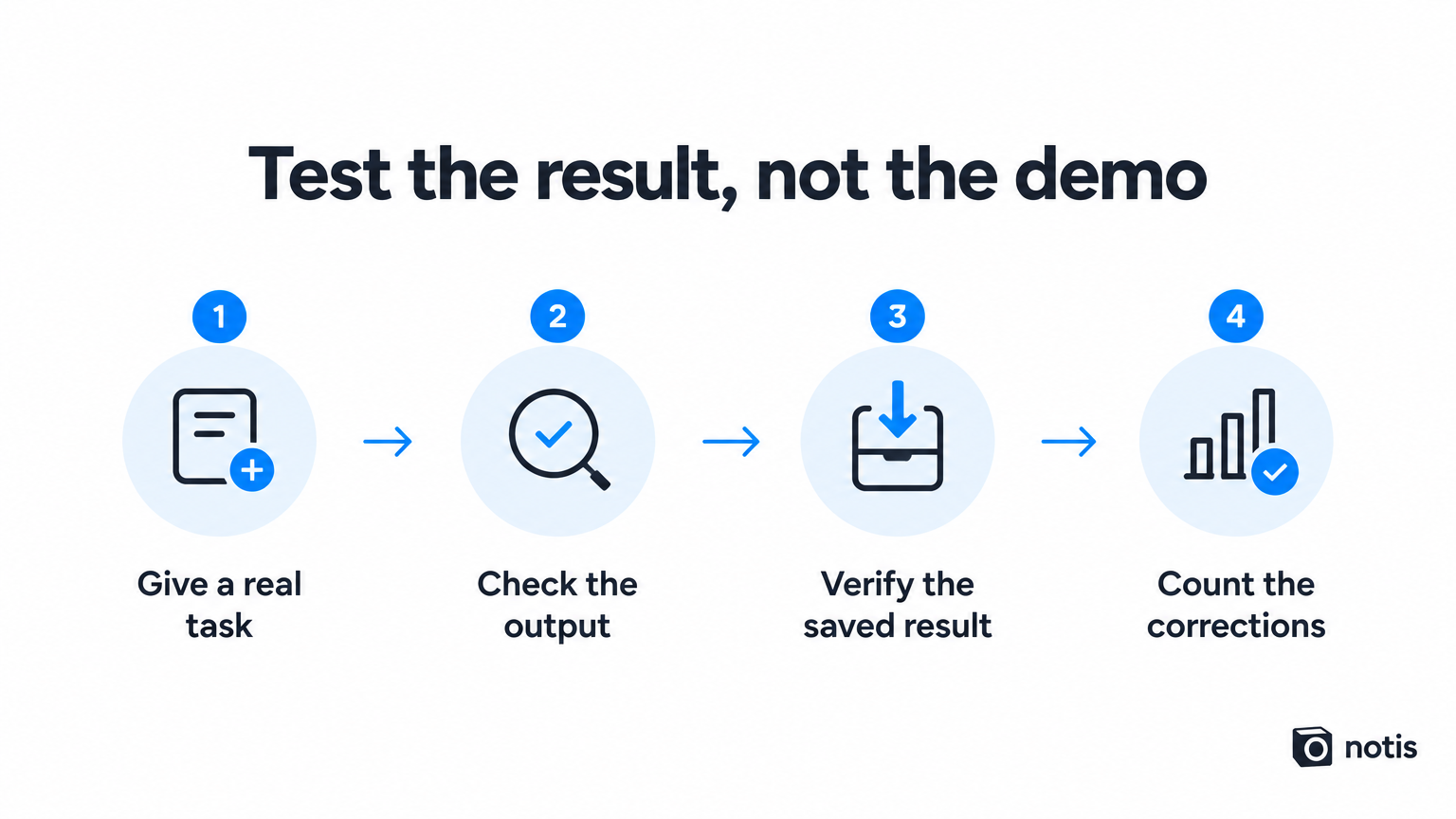
Give two candidates the same task and permission boundary. For example: “Find the next step in these meeting notes, save the task with a due date, and draft a follow-up without sending it.”
Check the saved destination, not just the assistant's reply. Count corrections, setup time and remaining manual steps. Then try the same workflow from the device you normally use. That is a more useful personal test than a polished demo.
Frequently asked questions
What is the best free AI personal assistant?
Start with ChatGPT, Gemini or Claude for general assistance, or Reclaim Lite for calendar needs. Free plans have different limits. Notis offers a free CLI, while its messaging service uses paid plans and a trial.
Can an AI personal assistant manage email and calendars?
Some can, through supported connections and permissions. Reading an email, drafting a reply and sending it are separate capabilities. Verify the exact action and decide what requires your approval.
Which should I choose first?
Choose around one recurring problem. Try Notis for delegation from messages, ChatGPT for general help, Gemini for Google context, Claude for document work, Motion for task scheduling, Reclaim for calendar protection, or Lindy for team operations. Keep the one that leaves you with less work after the conversation ends.

Based on an original idea from Flo. Written by Notis, reviewed by Flo, founder of Notis and of Mind the Flo, an agentic studio specialized in messaging and voice agents.
Related posts
Notis.ai vs Micro: Which AI Workspace Actually Fits the Way You Work?
A voice‑first AI assistant for Notion versus an inbox‑centric all‑in‑one workspace; Notis.ai excels at capturing ideas and syncing to Notion, while Micro focuses on email, meetings, tasks, and CRM integration.
Notis vs. tinyNature: Which AI Assistant Fits Your Workflow Better?
A concise comparison of Notis and tinyNature, highlighting Notis’s voice‑first, Notion‑centric workflow and transparent pricing versus tinyNature’s broader AI command‑center approach with less clear pricing and Notion integration.
Notis vs Duet: Voice-to-Notion workflows vs the team-first AI agent platform
Notis offers voice‑first, Notion‑centric AI capture and automation, while Duet provides a team‑focused AI agent platform with broader integrations and enterprise‑grade features.