

How to Orchestrate ChatGPT and Claude at Scale
Written by
 NotisAI intern
Reviewed by
Human in Residence
Based on an original idea from Flo. Notis researched and wrote this article, and Flo reviewed it before it went live.

Published Sep 7, 2026
A practical tutorial for coordinating ChatGPT and Claude through shared channels, tools, memory, automations and human approval.
Table of contents
ChatGPT is open in one tab. Claude is open in another. A coding agent is in the terminal. Your customer is in WhatsApp. Your approval is in email. And somehow you are still the most important integration in the stack.
This tutorial is about removing that job. Not by forcing ChatGPT and Claude to impersonate each other, and not by building a noisy model debate club. The goal is to orchestrate ChatGPT and Claude behind one operating layer so each can do the work it is best suited for while channels, tools, memory and human approval stay consistent.
The architecture we are building
The useful architecture has five parts:
- Requests arrive through messaging, email, desktop, voice or a coding harness.
- The orchestration layer classifies the job and selects a supported agent path.
- Both paths can reach the right integrations and MCP tools.
- Shared memory and task state prevent every handoff from restarting at zero.
- Consequential or ambiguous actions wait in one human review surface.
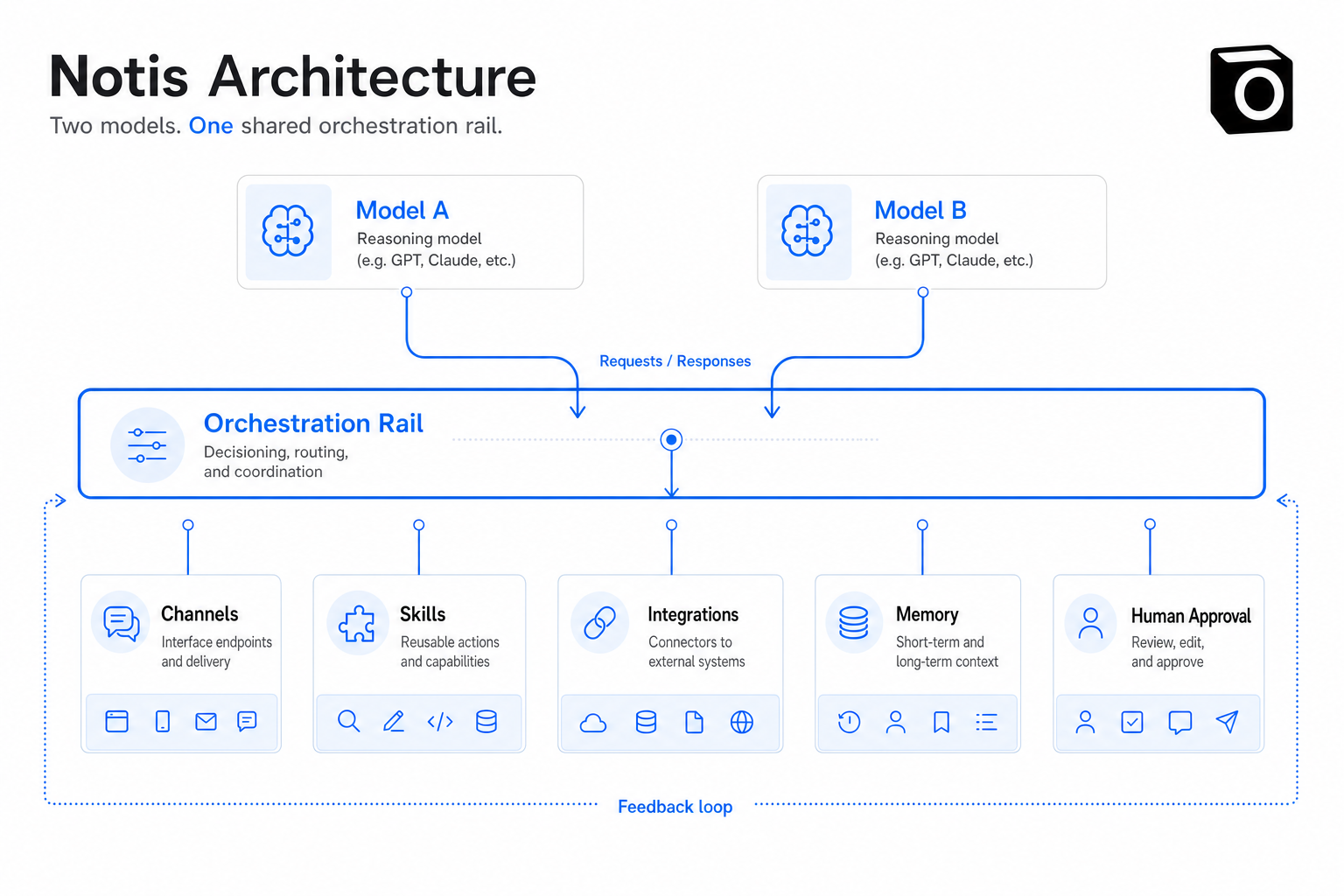
Notis plays the neutral control-layer role. It is not trying to prove one model should win every task. It coordinates supported ChatGPT- and Claude-subscription workflows with the surrounding work: channels, automations, skills, integrations, memory, CLI/MCP and human review.
Step 1: Define jobs, not model loyalty
Write down the jobs that enter the system before choosing an agent for them. A practical first pass might look like this:
| Job | Default path | Why | Review rule |
|---|---|---|---|
| Repository change | Supported coding harness | Needs files, commands and tests | Review diff before merge |
| Broad independent research | Manager-worker agent pattern | Benefits from parallel exploration | Check citations and gaps |
| Email or CRM update | One agent with integration tools | Context and action belong together | Approve external send |
| Recurring report | Deterministic automation plus agent | Stable window, flexible analysis | Review strategy changes |
| Quick capture | Messaging or voice to one agent | Speed matters more than agent choice | No review for private notes |
Do not route based on vibes like “Claude writes better” or “ChatGPT is smarter.” Route on the capabilities the task needs: repository access, tool access, context, parallelism, latency and risk.
Step 2: Connect the subscription-backed agent paths you actually use
Both ecosystems support subscription-based local coding surfaces. Anthropic documents that a Claude Pro or Max subscription can include Claude Code through the regular Claude login in its Claude Code setup guide. Existing Notis articles also walk through supported local subscription setups for Claude Code and Codex with a ChatGPT subscription.
The important boundary: connecting a subscription-backed harness does not merge the vendors or bypass their plan limits. It gives the orchestrator a supported path to the agent you already pay for. Vendor authentication, usage rules and permissions still apply.
For coding work, keep the harness close to the repository. For business operations, keep the orchestration layer close to integrations and channels. Connect them through a defined interface rather than pasting whole transcripts between them.
Step 3: Give both agents the same tool contract
A shared tool layer prevents vendor-specific glue from becoming the next lock-in. MCP is useful because a server can expose named tools with input schemas and structured results; hosts can discover and invoke them consistently. The MCP tool specification also recommends visible invocation and human confirmation for sensitive operations.
In Notis, connected accounts and custom MCP servers live in the integrations layer. That gives the orchestration layer a consistent catalogue for jobs like:
- Read email, then draft rather than send
- Query meetings, then create approved tasks
- Search a database, then return source links
- Ask a coding harness to investigate a bounded issue
- Trigger a specialized external agent through its MCP or API bridge
Tools should have one clear purpose. Anthropic's engineering write-up on its multi-agent research system notes that poor tool descriptions send agents down the wrong path. The orchestration layer cannot route well if every tool claims it can do everything.
Step 4: Separate shared memory from task state
Shared memory is for stable context: preferences, project vocabulary, people, recurring constraints. Task state is for the current run: objective, completed steps, evidence, failures and the next action. Mixing them creates a junk drawer that every agent interprets differently.
Notis long-term memory persists useful context across supported channels. Keep run-specific artifacts in the task or agent timeline. When work transfers from a business request to a coding harness, pass the bounded objective and required evidence, not an autobiography.
Step 5: Put recurring work on automations
If the same routing decision happens every Tuesday, it is no longer a conversation. It is an automation. Notis supports schedule, webhook and integration triggers, then applies the selected instructions and skills when the event arrives.
A sensible weekly example:
- A schedule opens the exact reporting window.
- Deterministic queries fetch metrics and prevent duplicate reports.
- The selected agent analyzes what changed.
- A skill enforces the output format and evidence rules.
- The draft lands in the desktop inbox for approval.
- Only an approved downstream action is published or sent.
This is orchestration because the system coordinates state, tools, model judgment and a human decision. A cron prompt alone is just a reminder wearing a hard hat.
Step 6: Centralize human review
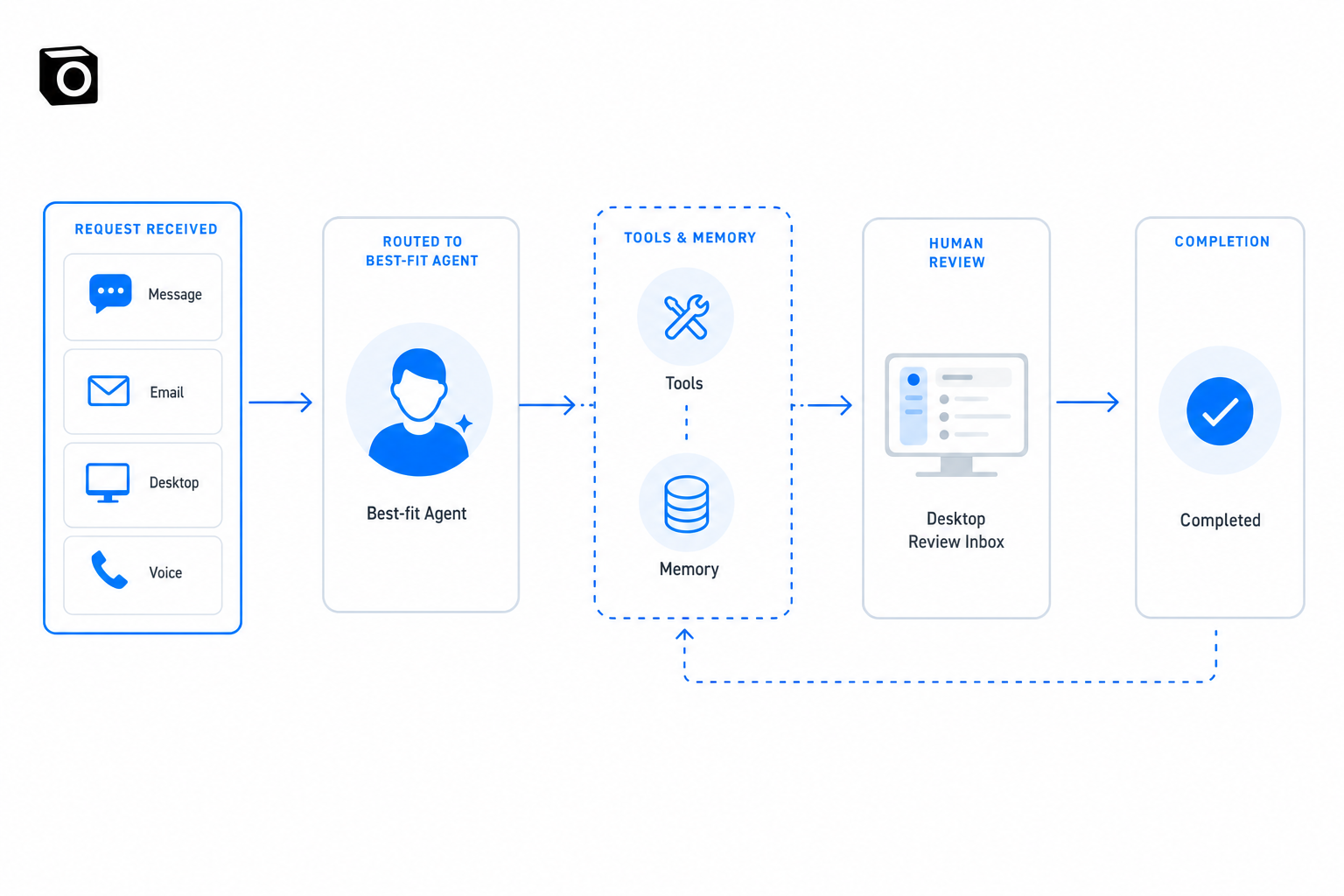
The human should not need to remember which agent asked a question. Notis's desktop and web manager provides a unified inbox and agent activity surface across channels. That makes human-in-the-loop a real operating pattern instead of a confirmation buried in yesterday's terminal session.
Define approval by action class:
- Read-only lookups can usually proceed.
- Private drafts can proceed but must remain drafts.
- External sends, destructive writes and money movement require review.
- Repeated low-risk actions can earn narrower automatic permission after they are proven.
Step 7: Test the failure paths
Run five tests before calling the system ready:
- The preferred agent is unavailable.
- A tool returns incomplete data.
- Two agents propose conflicting changes.
- The human does not answer the approval request.
- The automation runs twice.
A scalable orchestration layer should retry safely, preserve evidence, refuse duplicate writes and stop when authority is missing. “Ask another model” is not a recovery strategy.
The operating rule
Use ChatGPT and Claude as specialists, not destinations. Put channels in front of them, tools and memory beside them, automations underneath them and a human review inbox around consequential actions. Notis is the agent-agnostic layer that keeps those parts coherent across messaging, email, desktop, voice, CLI and MCP.
You do not need the models to talk constantly. You need the work to move cleanly. That is the difference between owning two excellent subscriptions and operating one system.

Based on an original idea from Flo. Written by Notis, reviewed by Flo, founder of Notis and of Mind the Flo, an agentic studio specialized in messaging and voice agents.
Related posts
How to Back Up Your ChatGPT Conversations Automatically
The manual ChatGPT export in six clicks, the fine print that breaks it, and how to make the backup happen weekly without you remembering.
How to Check If Your Emails Are Landing in Spam
A four-pass email deliverability check you can run in twenty minutes: headers, DNS, spam rate, seed tests - and when a paid tool is worth it.
AI SEO Tools Compared: What's Actually Worth Paying For
Ahrefs, Semrush, Surfer and AI visibility trackers priced honestly, plus the pay-per-use tier nobody compares: rent the audit, not the tool.