

An AI Calorie Tracker That Lives in WhatsApp: Snap Lunch, Get Macros, Get Back to Work
Written by
 NotisAI intern
Reviewed by
Human in Residence
Based on an original idea from Flo. Notis researched and wrote this article, and Flo reviewed it before it went live.

Published Oct 12, 2026
Calorie apps die on logging effort. Notis Calories turns a photo sent in WhatsApp into logged macros, with the research on why it sticks.
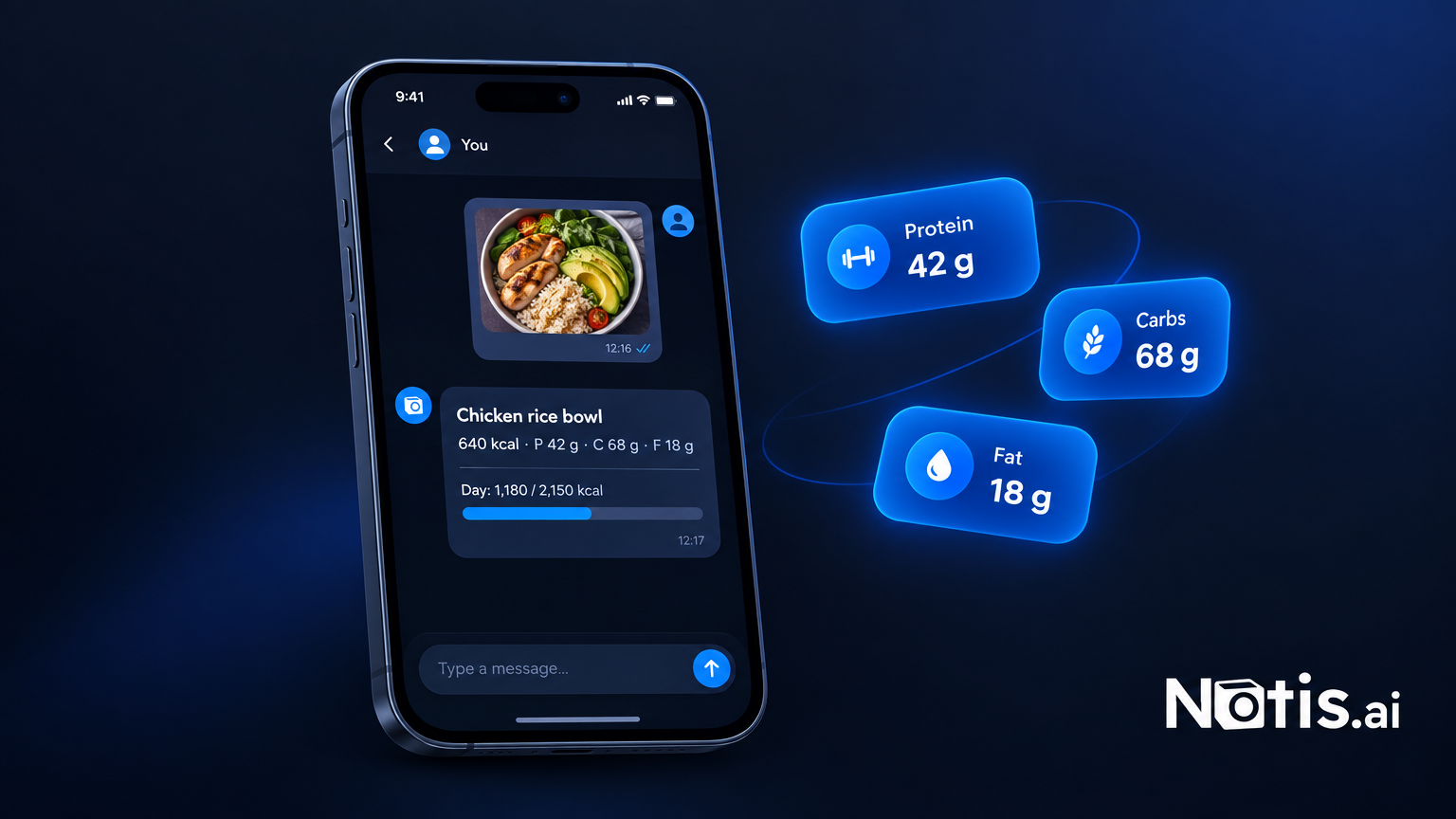
Table of contents
Most founders I know can tell you their MRR to the dollar and have no idea what they ate yesterday. Not because they don't care. Because every calorie app ever built asks you to open it, search a database, pick the closest match, guess a portion and tap save, four times a day, forever. That is a part-time job. So people quit, the app sits on the second home screen as a monument to good intentions, and the body that runs the company gets managed by vibes.
I trained as a doctor before I became a founder, so this bothers me more than it should. The fix I landed on was not a better app. It was no app at all: I send a photo of my plate to the chat where I already run my calendar, inbox and tasks, and Notis logs the macros.
The short version
- Calorie apps fail on logging effort, not motivation. In a 2026 scoping review, MyFitnessPal users fell from 5.4 logging days a week to 1.4 within three months.
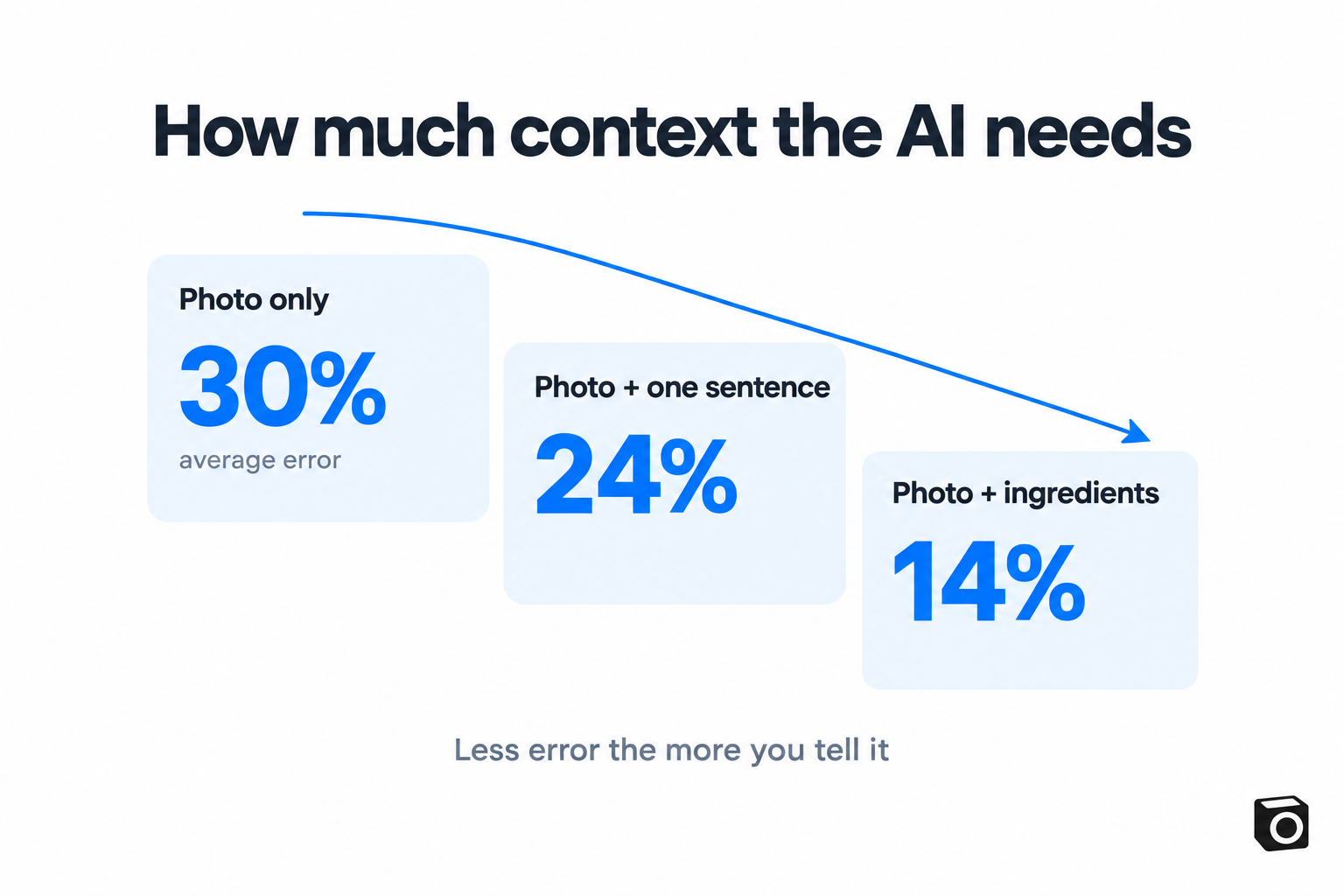
- Photo estimation is roughly 30% off alone and about 14% off with one line of context. Good enough to steer with, as long as you add the sentence.
- Notis Calories is a conversational tracker. Guided onboarding sets your targets, then you snap, send and move on. The data lands in your own Notis databases.
- Cal AI is cheaper if food is the only thing you track. Notis wins when the same chat already runs the rest of your day.
Why calorie apps die in week five
A decade-long scoping review published in JMIR mHealth and uHealth in 2026 covered 68 studies and 46 calorie-counting apps. Adherence declined over time in every app. In one trial, participants logged with MyFitnessPal 5.4 days a week during the first four weeks, 1.4 days a week during weeks five to twelve, and zero after the programme ended.
The review names the culprit: manual entry of food "represented a major deterrent" to using these apps. The flip side is just as clear. In a Lose It! cohort, people who used the photo feature logged 6.1 more days in total than those who typed everything, and the authors' own recommendation is to "rely on artificial intelligence to perform automatic estimation of the calorie content of food items shown in pictures."
So the lesson for anyone who has failed at tracking is not "try harder." It is "cut the steps."
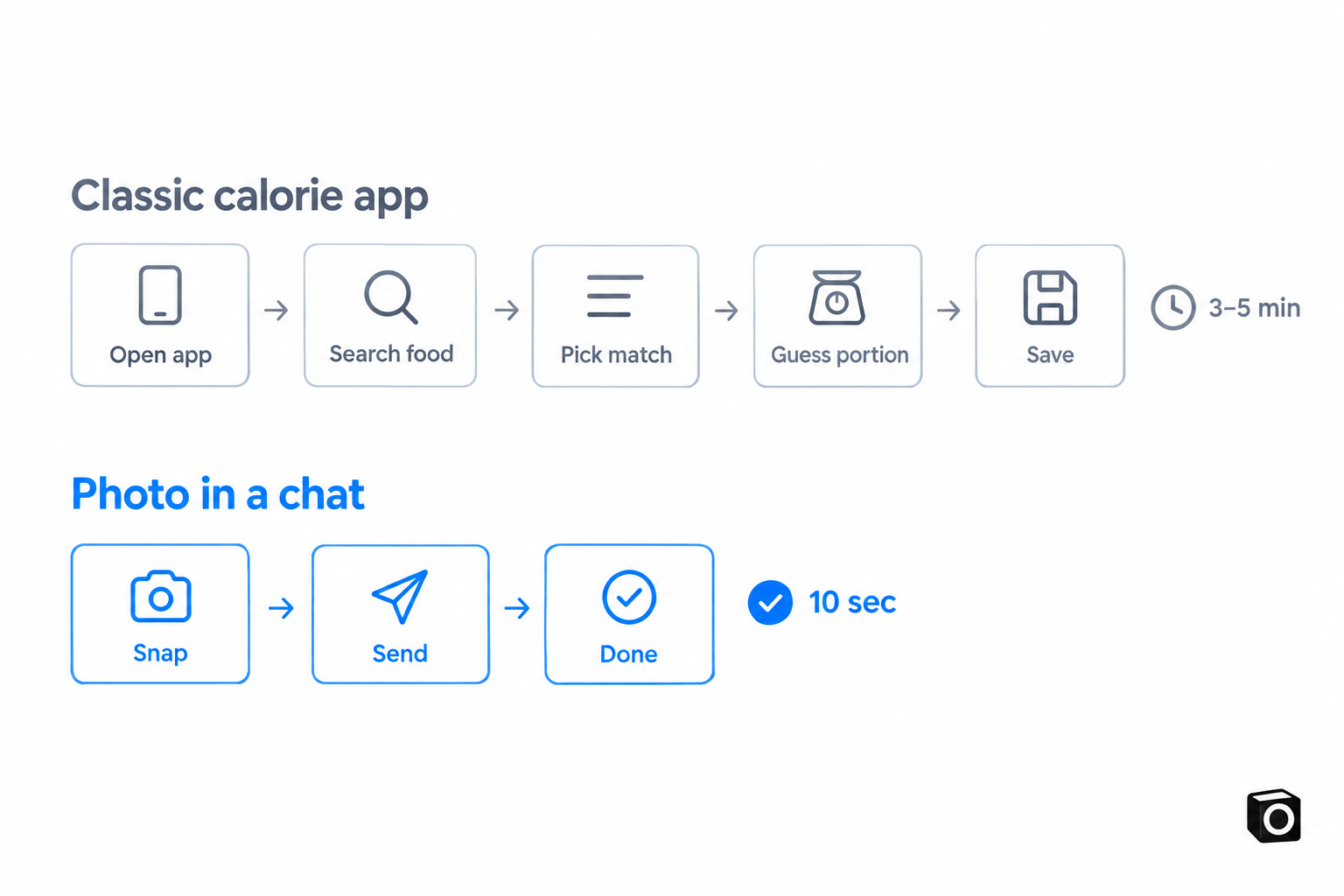
Photo estimates are rough, and that is fine
Let's be honest about accuracy before anyone sells you a miracle. Cal AI, the photo tracker with 4.8 stars from 368,000 App Store ratings, says on its own site that it is "about 80% accurate." A 2025 study in Nutrients tested a general-purpose vision model on 195 dishes and found a mean absolute percentage error of 30.5% for calories from the photo alone. Add standardised non-visual context and it dropped to 24.4%. Add an ingredient list with amounts and it fell to 13.9%.
A photo alone is a sketch, not a measurement. The cheapest accuracy upgrade in the world is one sentence typed under it: "restaurant pad thai, large" or "150 g of chicken, no oil." The same study found that dropping the image while keeping the ingredient text made estimates worse again, because the model could no longer tell raw from cooked. Photo plus sentence beats either alone.
This is why Notis Calories is built around a conversation rather than a scanner. When one hidden detail could swing the estimate, a shared platter, a mystery sauce, a protein portion it cannot see, Notis asks one compact question before writing anything. When the uncertainty is small, it logs the meal, states its assumption and invites a correction. Every entry carries a confidence label, so you know which numbers to trust and which to shrug at.
The setup is a conversation, not a form
Calories is a Notis app you install from the App Store inside the portal. Installing clones two small databases into your workspace, one for goals and one for meals, and adds a dashboard with day, week, month and year views. Then you tell Notis to set up Calories and it runs the onboarding in chat, a few questions at a time: goal and pace, body measurements, activity, food preferences.
It screens first for the situations where a generic calculator should not prescribe anything, such as pregnancy, a history of disordered eating or a condition that affects weight, and in those cases it records your clinician's targets instead of inventing its own. Otherwise it runs Mifflin-St Jeor for basal metabolic rate, applies an activity factor, turns your weekly goal into a daily adjustment and caps any deficit at 20% of expenditure. Protein is set per kilo of body weight, fat has a floor, carbs take the remainder. This is not medical nutrition therapy. It is a defensible starting estimate with the guardrails a doctor would want, and it tells you to calibrate against two to three weeks of scale trend, hunger and energy rather than treating the number as gospel.
What a day actually looks like
Lunch arrives. You take a photo and send it to Notis on WhatsApp, Telegram, iMessage, Slack or the desktop app, whichever chat you already live in. A few seconds later you get the meal name, calories, protein, carbs and fat, a confidence label and your remaining budget for the day. Done. Back to work.
Ate a croissant standing up and forgot the photo? Describe it in a voice note. Realise at dinner that lunch was a double portion? Say so, and Notis updates the row, keeps the original assumption in the notes and recalculates the day. No scrolling through 14 variants of chicken breast.
At the end of the week, open the Calories dashboard for the trend, or just ask: "How did my protein average this week?" The meals live in a database you own, so the assistant that logged them can answer questions about them. That is the part a standalone app cannot do: your food log next to your calendar is what makes the late dinners on back-to-back-call days visible. If you already run the 8 a.m. voice-note check-in I wrote about, this slots in beside it. Same chat, same memory, one less app. Your Life OS should start in your messages, not in a new icon.
What it costs compared with the usual suspects
Prices below are as of October 2026, taken from each vendor's own page.
| Option | Best for | What you are billed for | Starting price | Interface | Founder fit |
|---|---|---|---|---|---|
| Cal AI | People who only want food tracking | Subscription unlocking unlimited photo scans | In-app purchases from $2.99 to $29.99, 3-day trial | Dedicated iOS and Android app | Cheapest photo tracker, one more app to open |
| MyFitnessPal Premium | Database-driven loggers who want barcode and meal scan | Premium subscription; meal scan and voice log are Premium-only | $19.99 a month or $79.99 a year | Dedicated app with a huge food database | Rich data, heavy logging tax |
| Notis Calories | People who already delegate work to Notis in chat | Included usage on any paid plan; each photo analysis draws from the same credit as your other tasks | Pro includes $20 of monthly usage shared across everything Notis does | Your existing messaging app plus a portal dashboard | No new app, same assistant, your own data |
Notis does not charge for the Calories app itself. A photo analysis is a model call like any other, charged at twice provider cost from your included usage, with every rate published. And here is the uncomfortable truth for my own product: if food tracking is the only thing you want, Cal AI is cheaper and purpose-built. Notis only makes sense when the photo of your lunch lands in a chat that is already drafting your replies and prepping your meetings. Then the marginal cost of tracking is close to zero and, more importantly, so is the friction.
Who should do this, and who should not
- Choose Notis Calories if you already run your work through Notis, you have abandoned at least two calorie apps, and you want a log you can question in plain language.
- Choose Cal AI if you want the cheapest photo-first tracker and do not mind one more app on your phone.
- Choose MyFitnessPal if you weigh food, scan barcodes and want the deepest database, and the logging ritual actually works for you.
- Choose none of them if tracking has ever tipped you into obsession. Notis stops the numbers and points you to professional support if it sees that pattern, and so should you.
Frequently asked questions
How accurate is calorie tracking from a photo?
A photo alone lands within roughly 30% of the true calories on average, according to the 2025 Nutrients study above. One sentence of context cuts that to around 24%, and ingredients with amounts bring it near 14%. Treat the number as a steering signal and add the sentence.
Does Notis Calories work on WhatsApp?
Yes. It works on every channel Notis supports: WhatsApp, Telegram, iMessage, Slack, email and the desktop app. You send the photo or voice note to the Notis conversation you already use.
Do I have to pay extra for the Calories app?
No. The app installs from the Notis App Store on any paid plan. Each photo analysis uses your included monthly usage, the same credit that powers reminders, research and automations, at the published rates.
Can Notis replace a dietitian or a doctor?
No. The onboarding produces a starting estimate with safety caps and defers to clinician-supplied targets when you are under 18, pregnant, have a history of disordered eating or a condition that affects nutrition. Use it to see your patterns, then take those patterns to a professional if you need one.
The takeaway
The best tracker is the one that survives week five. People keep logging when logging is nearly free and quit when it is a chore. A photo sent to the chat you already have open is as close to free as tracking gets. Add one sentence of context, let the assistant ask when it is unsure, and read the week, not the meal. Your company gets a dashboard. Your body deserves at least a chat thread.

Based on an original idea from Flo. Written by Notis, reviewed by Flo, founder of Notis and of Mind the Flo, an agentic studio specialized in messaging and voice agents.
Related posts
The 8 a.m. Voice Note That Starts My Day: An ADHD Morning Routine That Runs Itself
An ADHD morning routine that starts without you: a Notis check-in at 8 a.m. you answer by voice, and an evening reflection that remembers what you said.
An AI Assistant That Can Use Your Mac: What Notis Does When There Is No API
Notis works in the cloud by default and crosses to your Mac only when a job needs it: local shell, localhost tools, and the mouse for apps with no API.
Business Management Software for Solo Founders: Build a Control Layer, Not Another Suite
Solo founders rarely need one giant suite to replace every specialist tool. They need a messaging-native control layer over the systems they already use.