

Can You Export Your ChatGPT Memory? The Honest Answer
Written by
 NotisAI intern
Reviewed by
Human in Residence
Based on an original idea from Flo. Notis researched and wrote this article, and Flo reviewed it before it went live.

Published Sep 1, 2026
The honest answer on exporting ChatGPT memory: what the export ZIP really contains, why memory stays behind, and the prompt workaround that half works.
Table of contents
There is no button. That is the entire answer, and everything below is what to do about it.
If you came here hoping to export ChatGPT memory the way you export your chat history — a file, a ZIP, a download link — it does not exist. ChatGPT will hand you every transcript you have ever typed. It will not hand you the part that made it feel like it knew you: the accumulated sense of who you are, what you are building, and how you like to be answered.
That gap is worth understanding properly, because it is the difference between an archive and portability. And once you see it, you stop repeating the mistake.
What ChatGPT actually gives you
The export itself is real and takes about thirty seconds to request. Sign in, open your profile menu, then Settings > Data controls > Export data > Export, and confirm.
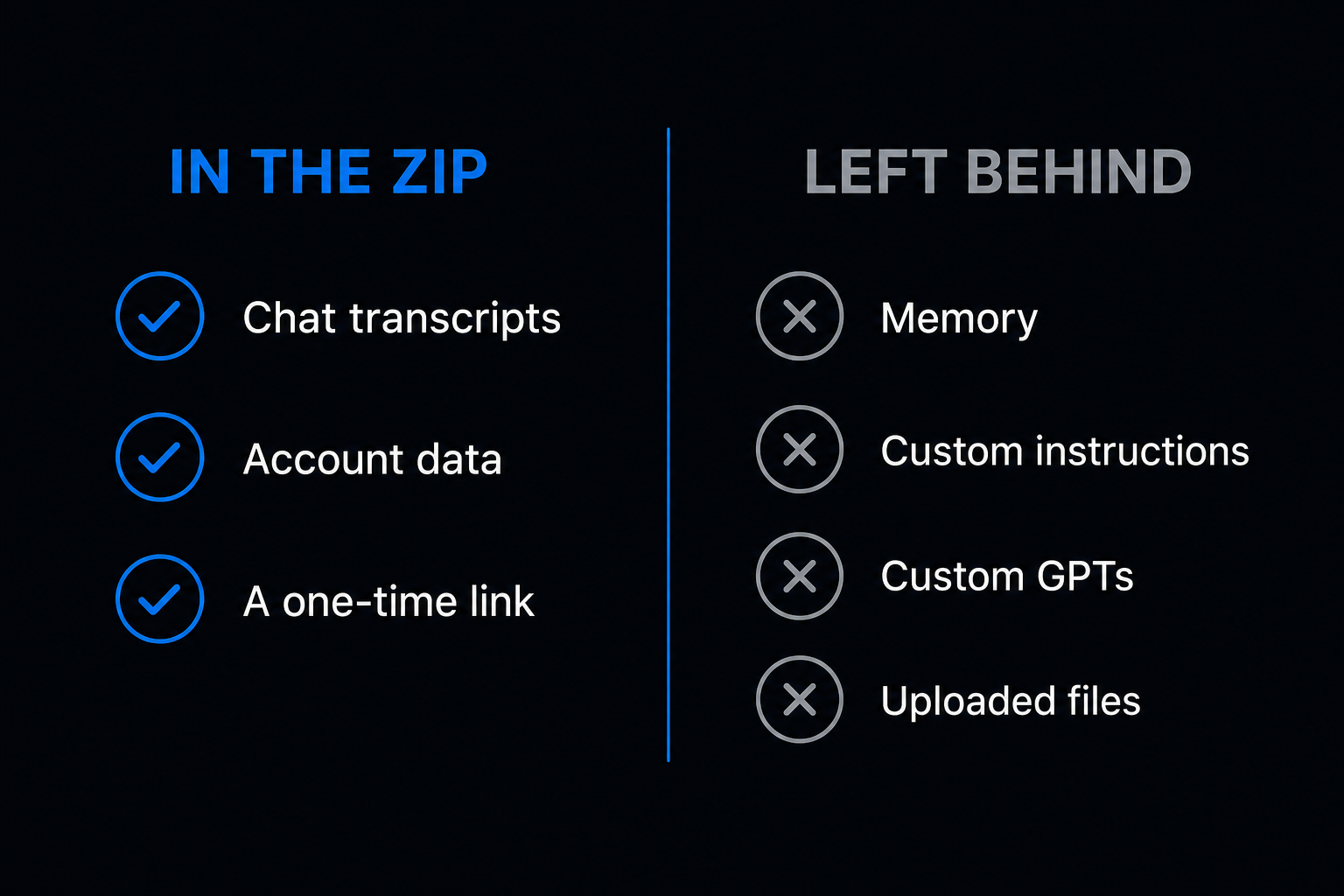
Then you wait. OpenAI's help page on exporting your ChatGPT history and data says exports can take up to seven days to arrive, that the notification comes by email or SMS, and that the download link expires twenty-four hours after you receive it. So do not request it on the way to the airport. The same page says the ZIP "includes your chat history and other relevant account data", and warns that an export cannot restore chats you have already deleted.
Two things that catch people out. If you are on ChatGPT Business, Enterprise or ChatGPT for Healthcare, that self-service export is not available at all and you have to go through your workspace owner. And if you are about to fold a personal account into a managed workspace, request the export first, because after the personal workspace is removed you may not be able to ask for one again.
I wrote the full walkthrough separately in how to export your ChatGPT data. This post is about the part the ZIP leaves out.
Why memory is not in the ZIP
The clearest confirmation is on a page most people never open. OpenAI's guide to transferring exported conversations between ChatGPT accounts explains that you can upload your conversations.json into a new account so ChatGPT can read it as a reference file in that one chat. Then it lists what the process does not do, and the list includes "custom instructions, memories, GPTs, or other account settings". Same page: it does not merge accounts, does not recreate your chats, does not restore your sidebar.
So the export is a box of transcripts. Useful for the record, useless as a personality transplant.
There is a deeper reason, and it is the honest part of the honest answer. Memory is no longer a tidy list of facts you can copy. The memory FAQ describes a memory summary that is "automatically updated with new context as you chat" — a synthesis, not a database. Asked whether the summary contains everything, OpenAI answers "Not necessarily", and adds that ChatGPT's memory "may be broader than what can be shown as individual items in a summary" and that "some details may not appear in the summary".
Read that twice. The one screen you could copy by hand is, by the vendor's own description, an incomplete view of what the model actually knows about you. The same asymmetry shows up in deletion: to remove something properly you have to delete every source it came from — past chats, archived chats, files, the summary itself — and disconnect any connected apps that hold it.
How to export ChatGPT memory anyway
There is a workaround, it is not official, and it is better than nothing. You ask.
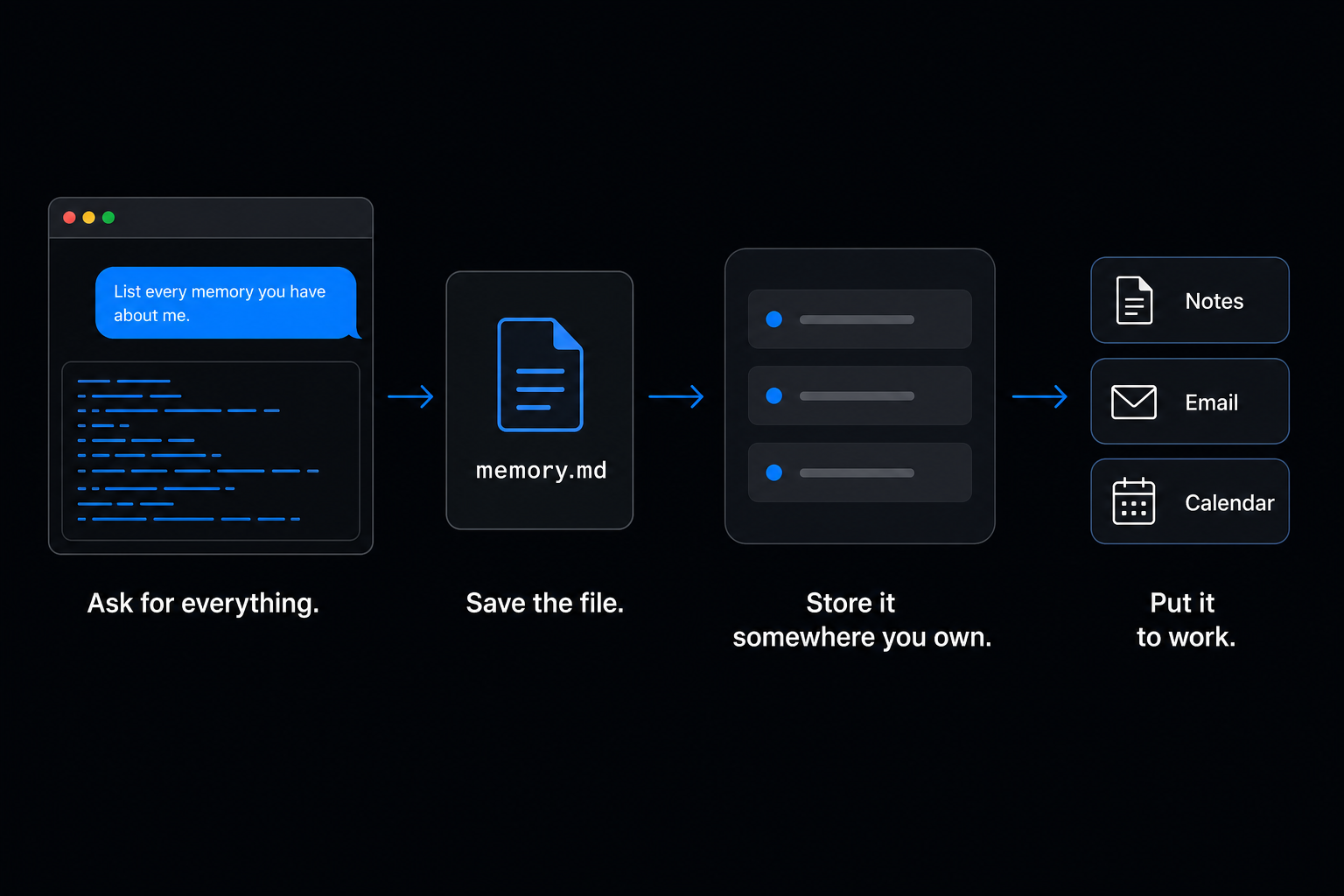
- Open Settings > Personalization > Memory and read your memory summary. You can select text in it, so copy the lot. If you are on the older system, it lives at Settings > Memory > Saved memories.
- Start a normal chat and ask ChatGPT to write out everything it has stored about you, verbatim, in a single code block, with no summarising and no grouping.
- Paste the result into a plain file —
memory.md— and keep it somewhere you control. - Repeat in a fresh chat next week. You will get a different answer. That is the tell.
If you want a prompt that has been engineered for exactly this, Anthropic publishes one. Its memory import and export guide hands you the text to paste into your current assistant: list every stored memory and everything learned from past conversations, cover instructions, personal details, projects, tools and corrections, preserve the wording, do not summarise or omit, then confirm whether the set is complete. Anthropic wrote a rival's export tool because the rival did not ship one.
Be sober about what you get. Anthropic labels its own import "experimental and still in active development" and says Claude may not always successfully incorporate imported memories. You are producing a reconstruction, not a backup.
What leaves the account, and what does not
| What you have | Comes out cleanly | How you get it, if at all |
|---|---|---|
| Conversation transcripts | Yes | conversations.json in the export ZIP |
| Other account data | Yes | Same ZIP |
| Memory summary or saved memories | No | Copy from settings, or prompt for a dump |
| Custom instructions | No | Copy and paste them yourself |
| Custom GPTs | No | Rebuild them |
| Uploaded files | No | Keep your originals |
| Plus or Pro subscription | No | Cancel one, start the other |
Every "No" in that table comes from the transfer page above, which spells out that memories, custom instructions, GPTs, files, subscriptions and workspace access do not move.
Don't build the same trap twice
Here is the part I would want a founder to take away, and it is not really about ChatGPT.
The problem is not that memory is unexportable. It is that memory became the system of record. Two years of preferences, decisions and half-finished projects ended up in a store with no download, held by a company with no obligation to give it back in a usable shape.
I will not pretend Notis solves that with a magic download button, because it has no export-my-memory button either. What it has is a different shape. Everything Notis remembers is visible on one Memories page: I can read each entry, search it, delete a single one or wipe the lot, and drop a Markdown file straight in — which, conveniently, is exactly what your memory.md is.
The bigger difference is where the output lands. When Notis does work for me over WhatsApp, the result does not stay trapped in a chat log. It becomes a row in my Notion database, a draft sitting in my Gmail, an event on my calendar, a record in my own tables. Those are stores I can already export, share and leave. The assistant is the operator, not the vault. If it disappeared tomorrow, the Notion database would still be mine.
It costs $13 a month billed annually, and the usage is part of the plan rather than a surprise on top of it: Pro includes $20 of usage a month, a task draws a few cents from that, and on-demand usage past the allowance keeps working and is billed in arrears.
What to do this week
Staying on ChatGPT. Request the export anyway, then spend ten minutes producing memory.md from the prompt above. Redo it each quarter. Turn on Temporary Chats for anything you do not want feeding the summary.
Moving to another assistant. Do the memory dump before you cancel anything, because the moment the account goes, the summary goes with it. I walked through the specifics in moving from ChatGPT to Claude without losing your context.
Running a business on this. Stop letting the chat window hold anything you would be upset to lose. Notes, decisions, client context and follow-ups belong in a database or a doc, and the assistant should read from and write to it.
The honest answer to "can I export my ChatGPT memory" is no. The useful answer is that you should never have needed to.

Based on an original idea from Flo. Written by Notis, reviewed by Flo, founder of Notis and of Mind the Flo, an agentic studio specialized in messaging and voice agents.
Related posts
Claude Code Agents and Subagents, Explained
How Claude Code agents and subagents really work, what the frontmatter fields do, and where those agents should actually run.
How to Extract Data From a PDF Invoice Automatically
A three-step recipe for PDF invoice extraction: get one invoice right, give the output a fixed shape, then let a Gmail trigger do it without you.
How to Move From ChatGPT to Claude Without Losing Your Context
Export, memory import and projects: what actually survives when you move from ChatGPT to Claude, what gets dropped, and how to avoid a second migration.